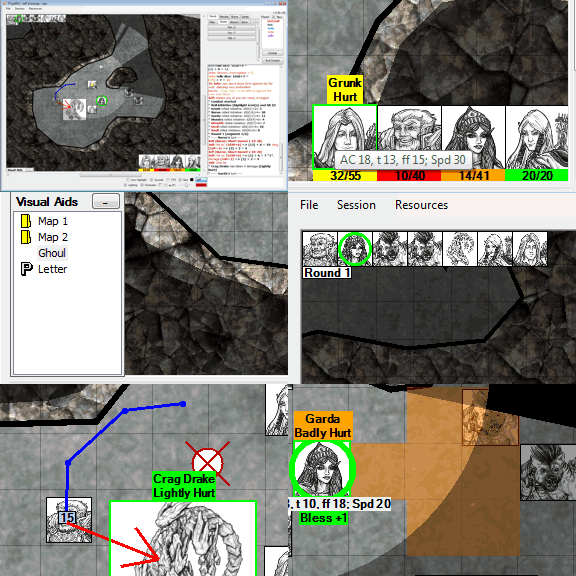
Welcome to my TTopRPG 2.0 page. Here, you'll find links for updating your machine to run TTopRPG 2.0 as well as the download EXE.
Click to find Downloads (OS Updates and install package)
You can often find me at the Paizo Chat Room. I log in there as Pygon.
NEW! Getting Started (You'll need to get TTop running first before using this page)
12/1/2016
Hello, all. It's been a while.
I don't have any announcements about any new TTop uploads. People have been posting requests, and I've been making notes of them, but making changes to TTop currently is not critical on my list. I'm glad there haven't been any important bugs really needing fixing and people are still enjoying the software.
I mainly wanted to let you know that the forum site, ttoprpg2.com, is currently suspended due to some dispute the hoster has with paypal, so they are unable to apply the funds I allocated. Hopefully the TTopForums site will be back online soon after their dispute is settled.
I also wanted to say that I've been developing my game coding skills and have been uploading progress for the past year to my YouTube channel, kilroy987. If you're curious what I've been working on, please check it out! I don't have any plans to develop and release a full blown video game at all, yet. I am trying to decide what I'm really going to do with what I've done, though, since detailed and animated 3d rendering has always been an interest of mine. Hopefully a decision happens soon.
10/27/2013 - Greetings all. I've decided to upload TTop 128 today.
I fixed a few bugs handling chat channels not having the same font size as the main chat, a reference to TTopLaunch 1.02 changed to 1.05 (there isn't a new version of TTopLaunch, I just had bad text in a message), checkboxes that shouldn't have been enabled in the client Settings screen, the map re-rendering itself too often as the mouse is moved around in it, a better tab order on the Connect dialog, and better support for Larger Fonts on the Settings dialog.
New features include (finally!) mass heal and damage. You can now select multiple icons to heal or damage. Fireball and Black Tentacles casters rejoice.
I changed the MapBuilder Show Indicators menu item to Show Adjusters for clarity. The Adjusters are those little symbol boxes you grab to adjust a shape. The indicator is that little box you can make appear in the main map mode.
When combat is ended, the Round number displays so you don't have to scroll back to figure out which round you ended combat on.
A user requested a faster way to make GM rolls public (without having to visit the Settings screen), so I added a checkbox at the bottom of the main form that syncs with the one in the Settings dialog. It will bold when you make GM rolls public to remind you that they are public. Note that this checkbox actually affects how clients see the results, as opposed to the other checkboxes on the main form which only affect that user's screen.
Back up your campaigns, and report problems to TTopForums, please. Enjoy!
Extra note: I had a strange bug while trying to build this version. mt.exe kept returning Error 31, resulting in a corrupted exe. It turns out it was because I had my Release folder open and visible while the code was building. There was some sort of locking problem between the Explorer window trying to display the attributes of the file and the mt.exe trying to write to it. If I minimized the explorer window, hid it behind another window, or closed it, the program built fine. Weird, and dumb.
6/11/2013 - Oh look, yet another release! TTop 127 is now live.
A user asked about how to use map tiles to build a map, and I told him about MapBuilder and how he can put map tiles next to each other. But it got me thinking - usually, map tiles have their own grids, and it's difficult to resize a graphics's grid to the TTop grid if you don't have control over the center on which objects resize and rotate. So I added a movable rotation point to images, rectangles and ellipses in MapBuilder. See it in action here.
I also tweaked a few other things about MapBuilder mode, like reseting an object's original height/width ratio, zeroing the angle, rounding the angle during rotation to even degrees, making a rectangle or ellipse into a square or circle, and providing indicators that let you spin, fade or hide/show shapes from the main map mode (just like the indicators used to hide/show light walls - see a demo here), and fixing a few minor bugs.
Success rolls of nd2e1 were exploding infinitely, so I put a further limitation on them (can't have an explode of 1, period). Also, a user asked for enlarged die roll results for greater visibility. You'll find that in Settings.
Markers can now have notes added to them by anyone. Highlighting a marker reveals its note. GM notes are also visible, so GMs should use info boxes if you wish to keep something hidden from players. I also tweaked flares so that resized maps don't affect their borders so much.
I made a couple more tweaks to the support for larger fonts - The Visual Aid window was still minimizing to the smaller font alignment, and the maximum width for icon notes was still calibrated to smaller fonts.
Those who have lots of maps in their campaigns can now organize them into folders. This doesn't create folders on your disk, just in the right click load menu. You can assign folders to maps using the Map Manager.
These are pretty significant changes, because they affect your saves and map index files. So even though I've tested this as hard as I could and found no problems, please, please, PLEASE back up your campaigns before trying this build, and let me know about problems immediately at TTopForums! (You'll see php error messages when you log in, but you can still post).
05/12/2013 - Greetings all. TTop 126 has been uploaded.
Work has been busy, and the need to upgrade TTop to handle requests has been light. Don't take that as me not listening to your requests on TTopForums - I am taking them to heart and weighing the worth of the effort it takes to add things without risking the stability of how the app already works or making the interface too clunky.
Also, a few months back, my hoster unexpectedly upgraded their php scripting engine which had some minor effects on TTopForums. I haven't entertained the notion of fixing all of the various problems (most notably, error messages when you log in and post to threads (even though the login and posting still works) and the displaying of escape characters in the thread messages). Hopefully someday I'll get around to cleaning that up. Partially, as a result, I haven't visited TTopForums as much as I used to - I saw a request that was posted on 4/22 that I noticed just yesterday, and I was surprised that it had been that long since I visited. That doesn't mean that I'm letting TTop die or am losing interest in supporting it. I'm glad people like using the app, and I welcome any feedback or requests you come up with - they give me honest ideas of how to improve it. I'll try to visit more often so I can once again more quickly respond to questions or requests.
On to the changes in 126: This new update handles some minor annoyances and adds a few minor conveniences. One user noted that a /table result of more than 400 characters crashes the app, so TTop now chops off any result beyond the 400 character boundary. When working with lighting, W will start a new wall, F will flip the wall while plotting, and the wall facing will be remembered for the next plot. You can Copy macros now, either into the current tab or into a completely different one, even between Character and Monster modes. Currently, you can only copy one at a time. There was an error in the Paste menus for lights and shadow walls - they now say ctrl-V instead of ctrl-C. Those of you running with larger font settings can rejoice - the Edit Macro and Place Icon screens no longer cut off controls because of the enlarged font size. One user asked about setting the background color of the chat log so that it isn't so bright, so I offered a few shades of gray there. The text entry area now changes to a papyrus color when you are chatting in-character to help notify you which chat mode you are in. You can now remove a combatant from combat (resetting their initiative roll) without have to go into the Combat form. I added a Session setting that sends larger keepalive and wakeup packets that might help with some users mysteriously losing their connection to TTop while their internet connection remains stable - this is an experiment that I have not yet proven out. Finally, to support an upcoming game of Shadowrun that I will be playing in, I added a /sr roll that accepts number of dice, type of dice, explosion number and success number (/sr 5d6e4s5 will roll 5 d6s, explode on 4s and count 5s and up as successes).
Upcoming changes (I can't promise when) will likely focus on expanding TTop to support the more hardcore GM crowd, including options to more readily support moving data between campaigns, and the ability to package and import campaigns or other resources so that they can be more easily shared between users. This will take some careful planning without having to restructure TTop's current file arrangement or interfere with compatibility of older campaigns. It will take a while, and work is still busy, so I'll post when I have something more concrete to share.
Thanks again, and game on!
As always, backup your campaigns before using this new update, and report problems to TTopForums!
12/11/2012 - TTop 125 uploaded. Some minor additions to this one. I fixed a bug that sometimes caused a graphic to not download to a client, map names with '&' in the name appeared incorrectly in the right click load menu, 14pt and 16pt chat font sizes are now supported for those who like projecting TTop on a wall or large screen, the chat logs can now be generated with a time stamp, and FATE (-1, 0, 1) dice support has been added (use f as the die: df, 4dF, etc.)
As usual, report problems immediately to TTopForums.
10/12/2012 - Hello again. Work has finally calmed down on one front, and is about to get busy on another. So active development on TTop and its Mac port is still paused. I have made a couple tiny tweaks to TTop, but not enough to warrant a new upload yet. In the meantime, I'm finally Blu-ray enabled and have been enjoying choice movies on Bluray. I even examined the difference between 1080p and 720p at usual viewing distance, and talk a bit about the 4K TVs on the horizon here.
7/19/2012 - Greetings all. No update at this time. I just wanted to report that my first PaizoCon was a very worthwhile experience. I got to meet a lot of forum and chat goers, and attend a seminar with all the authors, mapmakers and artists for Rise of the Runelords. The seminar can be found here. Highly recommended. Work has been keeping me VERY busy lately, so I haven't made a lot of progress on the Mac conversion since the beginning of the month. I hope to get back to it soon.
6/22/2012 - I suppose it's time for an update. I've been working hard on the TTop Mac port. Check my progress on the link to the left. Throughout the process, I've found some things that were odd or wrong in the Windows version and corrected them. Most of you probably didn't know most of these bugs were there. I corrected some rendering inconsistencies with explored regions and black occlusions, 4e darkvision rendering, and tag arrows of zero length. The Remove All Markers and Remove All of My Markers right click options weren't displaying properly if only flares were on the map. If archive validation fails when connecting to a session, the in-memory registry is also wiped so it can start fresh again. The username wasn't updating properly on the OOC button when a GM connects to a proxy host. Co-GMs weren't alowed to modify PC icons (they can still only change the graphic and the name, just like players). The Move Combat Counter Back One menu option wasn't always working. Finally, if you have multiple network cards installed, when you start hosting, TTop should list all your local IP addresses.
As usual, back up your campaigns. And if you have any problems with this release, PLEASE let me know immediately at TTopForums.
6/4/2012 - Here's a weird one. When I hosted last weekend, my external IP ended with a .0. One of the connecting client machines seemed to refuse to accept packets from me. So I had to proxy host through a player that had a different IP address, and it worked for the other player. I wouldn't know how to control the ability of TTop to communicate successfully to a router or firewall that denies packets from .0 IP addresses, so if you run into this issue, try proxy hosting.
5/20/2012 - One of my users reported that Norton seems to have a problem with the user typing into TTopRPG's IP address field when trying to connect to a server or editing a macro. Norton complains about a "keystroke capture" and quarantines the TTop exe. I certainly haven't programmed any capturing into TTop - not in a way that communicates information, anyway - only to tell you how many characters you have left to type in the macro command field. I've only just started hearing about this. The user referred to his version of Norton Antivirus as "Norton 360". I don't run Norton at home, so I can't elaborate much. If you run into this issue, you can tell Norton to ignore the program by excluding it in Norton's Restore/Exclude functionality - that's how he finally got it to accept the program.
If you are also encountering this issue, please post at TTopForums. I'd like to know more about this, specifically how often it's happening.
I'll be honest and say I don't know if there is some virus on my own development machine possibly planting something in my exe, but I run Free AVG at home and it hasn't been reporting anything about my development or the application when I run it myself.
5/13/2012 - While starting up a game this morning, the GM told me the local IP address displayed when hosting was not correct. It turns out he has multiple network cards installed, and TTop is just grabbing the first one that qualifies as a sensible IP and displays it. I'll correct the code to show ALL IPs that possibly qualify in a future release. In the meantime, trust the IP you've been using to host through, and my apologies to new users that are confused by the wrong IP sometimes being shown.
5/9/2012 - Greetings all. The conversion of TTopRPG to Mac is proceeding forward. So far all I have done is the networking code, and I was able to proxy host through the iMac. So that's progress. In the meantime I tweaked the Windows version a little and have a new version ready.
TTop 123 corrects a rare potential bug with guaranteed packets being communicated (a guaranteed packet could be mistaken for a normal packet and interrupt the flow of information). Also, when you enter a server name or IP address, the spaces are automatically removed. I found that when I was hosting through a proxy server, map chunking crashed the application. The local IP appears when you host to better provide you with information for port forwarding. I added ipchicken.com as another recommended site to get your external IP address, since whatismyip.com has been adding spaces lately for some odd reason. Finally, I fixed a bug affecting timeout counts recorded by clients when the host times out.
Please let me know at TTopForums ASAP if any of this new functionality (particularly the display of your local IP or removal of spaces from server names and address) causes problems for you and I'll remove the functionality as soon as I can.
4/1/2012 - TTop 122 released. Just some minor tweaks. I added a white center to the map flares to make them more visible, added Home/End hotkeys to adjust a MapBuilder object's transparency by 10 (so you can now make something gradually appear/disappear to your players without having to drag the indicator and releasing in steps), fixed a minor bug that caused negative initiative rolls to appear incorrectly in chat (always off by 1), and found a lock-out bug on the Info Box dialog screen.
Also, I've been working on a little bit of something else. But don't get your hopes up, it will be months, I would guess, before this is fully functional. XCode 4 is not easy to pick up when you're used to Visual Studio 2008 Express. I'm going to take this nice and slow, and carefully. And no, this is not an April Fool's joke :) hope yours was enjoyable.
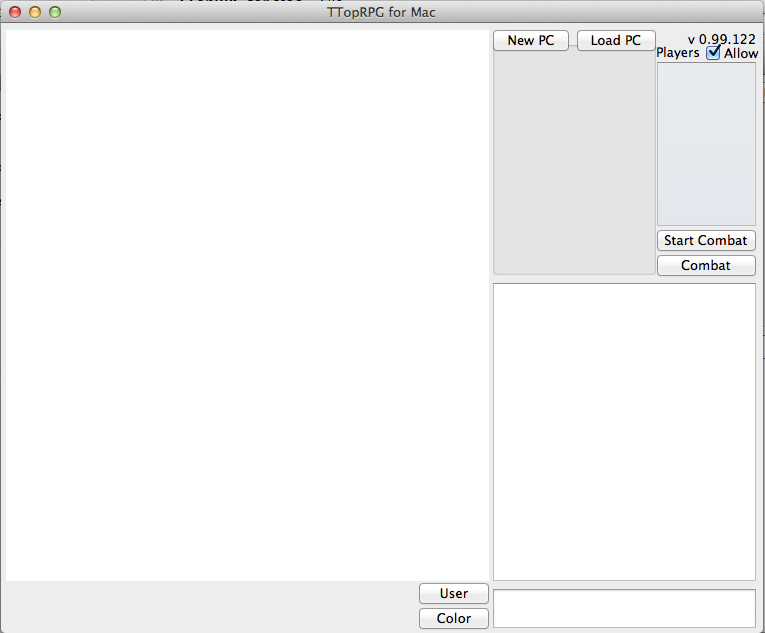
2/11/2012 - TTop 121 released. I've added a small experiment to this one. By shift-left clicking the map quickly, you can drop a 4 second map flare that serves as a temporary marker. Try it out, let me know if you don't like it. Let me know in this thread on TTopForums!
Note: I originally uploaded a 121 version that allowed you to drop a flare by simply clicking the map. But this caused a flare to be dropped whenever you double click an object. A few minutes later, I uploaded the final version that requires holding the SHIFT key to drop a flare. If your app is dropping flares from a simple left click, just get latest on 121 again.
1/29/2012 - TTop 120 released. Just a minor addition to this one. I added some bias analysis on the /dicestats command. It approximates whether or not the die roller is biased in any way. Sometimes, rarely, it decides that one particular die type "needs to be retired", but most of the time it evaluates as "sufficiently random". Do with it what you will. The methodology came from an article in Knights of the Dinner Table magazine #73 to test the random qualities of your dice.
Also, I tried an experiment recently where I retooled the die roller to flip its results. That is, on the d20, a 1 returned a 20, and a 20 returned a 1, and so on. After two sessions using this version, I asked if people noticed any difference in the die rolls. Some people said that they felt like they were rolling better. However, enough people said that they noticed no difference in the rolls that I concluded that a pattern of bad die rolls was more a matter of perception than a fault of the random number generator. So, I took out the tweak. I also concluded that TTopRPG simply hates players :)
12/26/2011 - I hope everyone had a nice Christmas!
TTop 119 released. I didn't like that you suffer a rendering lockout while a map is being prepped for chunking (new with 118), so 119 instead allows the prep to occur over time in the background. This prevents the lockout (but scrolling will be slow until it's done), and also prevents very slow machines from suffering a timeout as a client, or causing timeouts as a host.
In addition, I didn't like that zoomed out rendering on large maps was still slow, so enabling chunking will also speed up zoomed out rendering. For a very large map (my test map is 3200x5000), fully zoomed out rendering (step 1 and 2) in 119 is sped up 6x, and at steps 3 and 4 is sped up 2x. Unfortunately, this further increases the memory use by about another 20%. There is no speed difference in 119 for zoom steps 5-11 in 119, but chunking speeds up step 5 by 2x, and 6-11 by 5x and upwards.
To give you some figures, the 3200x5000 map uses 60 megs of memory without chunking, 128 megs with 118 chunking, and 148 megs with version 119 chunking.
More figures (using 3200x5000 map in a fairly large TTop window, 4-Core 2.4 GHz, Vista, 4 GB RAM):
| Zoom Level | No Chunking (60 megs) | Chunking 118 (128 megs) | Chunking 119 (148 megs) |
| 11 (full in, 7.59) | 10 fps | 60 fps | 60 fps |
| 10 (5.062) | 10 fps | 60 fps | 60 fps |
| 9 (3.375) | 10 fps | 60 fps | 60 fps |
| 8 (2.25) | 10 fps | 55 fps | 55 fps |
| 7 (1.5) | 10 fps | 45 fps | 45 fps |
| 6 (1.0) | 10 fps | 45 fps | 45 fps |
| 5 (0.667) | 10 fps | 25 fps | 25 fps |
| 4 (0.444) | 10 fps | 15 fps | 25 fps |
| 3 (0.296) | 10 fps | 12 fps | 25 fps |
| 2 (0.197) | 10 fps | 10 fps | 60 fps |
| 1 (full out, 0.131) | 10 fps | 10 fps | 70 fps |
The changes in 119 won't affect your 118 campaign files, but will affect the 117 campaign files. Just to be sure, back up your campaigns as usual. Report problems immediately to TTopForums!
12/18/2011 - TTop 118 released. To support my conversion of the Forstor Nagar adventure (released for VTTs by Rite Publishing), I had to add the ability for GMs to place MapBuilder shapes that only they can see.
Also, I'll be running Serpent Skull #3 (City of Seven Spears) soon, and I wanted to support a very large map graphic without slowing down map scrolling, so I added "map chunking" - it splits the map into 512x512 chunks and only renders the pieces visible in the map area, so zoomed in scrolling is much faster. A warning about using map chunking though - on slow machines with not a lot of RAM, the preparation of map chunks may cause such a long timeout that your connection drops. I made map chunking an optional setting in the Settings screen. If any of you notice any seams in the rendering, please let me know at TTopForums. Also let me know which OS you are running - apparently Win7 was showing seams when Vista and XP were not, so I had to adjust how the map rendered to prevent them.
I also fixed some smaller bugs (invalid characters in campaign names, macro tabs and icon names that resulted in errors when you attempt to save a file for them, and I found that trying to drag a box on a huge map limited the diagonal size to around 4500 pixels - that's what I get for trusting long variables to hold squared sums).
As usual, back up your campaigns and report problems immediately to TTopForums.
9/7/11 - TTop 117 released. A couple more Alpha Omega enhancements are in this one: You can tell TTop to count segments instead of rounds in combat mode (2-10 segments per round - note that the Round timer will count down by segments instead of rounds if you choose to use segments), and you can set up a initiative die roll phrase for icons, such as 4d6+2d4. A simple number still works for init mod, too. I also fixed a small bug with Ctrl-Space that might tell you the map changed.
Your campaign.txt, map save files, and icon export files will change with this release, so as usual, back up your campaigns. Report problems immediately to TTopForums!
6/26/11 - TTop 116 released. A user requested facing indicators because he's planning to run Alpha Omega. Another user mentioned using the indicators for Battletech, which allows a primary facing and a secondary facing (which I called inner facing for now). You can access the option next to 'Tag Arrows' in the right click menu. Co-GMs can freely use this, too. You can enable it as a Player Freedom as well (players can only set facing on PC icons). The hotkey for it is G since, well, every other letter in 'Facing' is taken.
Also, GMs will rejoice that I have finally attached a hotkey for the combat Advance Turn function. Ctrl-Space now advances the turn.
Back up your campaigns, as always.
5/16/11 - Greetings. TTop 115 is released. This one addresses a bug I've left in there for who knows how long that will cause an error while loading a map if you attach an area effect to an icon then save and reload a few times. Thanks to Sizik from TTopForums for bringing it to my attention. I've also expanded the /dicestats command to display more information about d20 rolls (it shows how rolls repeat and counts each die roll after rolling 50000 times).
4/15/11 - Wow, how time flies. Could it be an actual update? Yes! I've been toying with adding macro functions per request from a user, but they aren't ready yet. In the meantime, I've implemented some little tweaks: The heal and damage dialogs now only accept numbers between 0 and 32767 (before, they crashed if you entered a number that was too large). Also, when plotting light walls, TTop will remember which mode you used on the last wall and apply it to the next one. You can also toggle the mode of a wall while you are plotting it with the L key (between shadow and darkness). Finally, the +/- keys will zoom the map in and out for those of you without a mouse wheel.
Macro functions are still forthcoming. Stand by.
1/12/11 - Hi all, been a while. How do you work this thing again?... I just wanted to say TTop is still well within my awareness. Work has been hectic delivering and supporting a large system in November. And I've needed a more intense distraction from work lately, so I started playing World of Warcraft again. I'll eventually get back on TTop and put out more updates. I haven't selected what is coming next yet. Probably just some minor bug fixes and maybe a couple more player freedoms like placing areas of effect. Maybe.
10/30/10 - TTop 113 released. I've upgraded the hex maps to support snapping to grid. I recommend setting the icon sizes a little smaller (4 for medium, 8 for large, 13 for huge, 18 for gargantuan, etc.) so that it's clear which hexes the creatures occupy. I've also upgraded the download routines a little bit more, including a new TTopLaunch 1.05. Grab it below or download it from Resources in TTopRPG.
10/23/10 - URGENT - My hoster changed some protocol that prevents TTopLaunch from working properly. You'll know this error hits you when you see the dreaded "Cannot Connect to Database" message when updating with TTopLaunch. It messes up your version.txt AND your TTopRPG.exe.
Here is TTopLaunch 1.05. It will repair your TTopRPG.exe and version.txt. Using this exe is the easiest option to fix the troubles. Make sure you extract it into the same folder as TTopRPG.exe. And back up your campaigns!!
You can also directly get the latest release (112) of TTop from here for now. Sorry about that. I'll have to get with my hoster when he is available.
I just tried to access the hoster's site to get support info and it is "down for maintenance".
UPDATE: The hosting service is back up. Make sure you get TTopLaunch 1.05, though, so that the next time this situation occurs, your version.txt and TTopRPG.exe won't get corrupted.
10/21/10 - TTop 112 released. This is my first cut of hex maps. As such, it writes new lines into your mapIndex.txt so DEFINITELY BACK UP YOUR CAMPAIGNS, just in case. I tested it best I could and got no errors on my end, but I can't offer repair services in the event it messes something up. Let me know at TTopForums AS SOON AS POSSIBLE if there are problems, though, and I'll try to deploy a fix quickly if one occurs. Also, in the process of testing the index writing, I found and fixed another bug that caused mapGridY lines in the index file to be repeated for blank maps. If you load that blank map and save it again, the mapIndex file will be cleaned up for that map.
This release of hex maps allows you to choose a vertical or horizontal hex grid, allows you to resize it using the points or sliders, and supports hex counting with the drag and plot paths. I haven't implemented triangular icons, snapping to grid or hexagonal area effects yet. I'm not sure when I'll get to that.
9/26/2010 - TTop 111 released. You can now broadcast an Infobox to a single player. Some input box entries, when cancelled, treated the entry as empty. Now the cancel button will actually cancel the operation (nost notably when you are creating a new macro tab and adding new variables). Finally, a European user reported an exception when hosting and a user chatted or used a macro. This is related to a fix I put in 105 which logs chatting by referring to the log file by full path name. If the path has European characters in it, it wasn't properly stored. I've uploaded what I think is a proper fix.
9/4/2010 - TTop 110 released. I noticed when I dragged a macro button around that it didn't display italicized or bolded text. It does now. Also, a user requested that I add a Remove All Variables function on the macro tabs. Sorry if I haven't gotten to any of your requests yet. I'm keeping them listed or in mind!
8/28/2010 - TTop 109 released. Just a small change in this one. If an icon has nonlethal damage, its tooltip text reveals the actual nonlethal amount and the remaining hp. This helps when players need to know the two values separately for whatever reason. Eventually I'll add the extra rule that nonlethal damage taken beyond your current hp becomes lethal. That's not in yet.
8/17/2010 - TTop 108 released. When a creature that dies at 0 hp reaches 0 hit points, its icon in the initiative list didn't show an X. Also, there was a strange bug causing some players to be assigned coGM when they weren't.
8/13/2010 - TTop 107 released. Apparently in my meandering, I accidentally hid the Marked By arrow option under all conditions. That's fixed. Also I found that toggling visibility on an icon while not hosting pops up an annoying message every single time. Also fixed.
8/10/2010 - TTop 106 released. A very minor revision in this one. After playing in a game last weekend, I found it prudent to make a small modification to the code that few people will notice.
8/5/2010 - TTop 105 uploaded. This is the first cut of coGMing. I wasn't able to work in monster macros for coGMs yet, but coGMs can move monsters, toggle their visibility, roll their initiative, and damage and heal all icons.
There was a bug in XP that caused an exception when chatting took place while the GM was browsing for a graphic - this has been fixed. I was also tired of being told I need to load a campaign to host, so that message gives you the option to hop to the load dialog.
Try out the coGM functions. I know not having monster macros will be painful, but I'm working on it! It's hard stuff. Note that even though monster macros aren't available yet to co-GMs, they can still make Character macros for themselves that serve the same purpose.
As always, back up your campaigns in case for some odd reason this build threatens your files (I don't expect it to). Report any problems to TTopForums!
8/1/2010 - Wow, it's been a while. Don't worry, TTop hasn't lost my attention. I've started playing in an Age of Worms campaign, and the GM suggested he might want to let someone else run the occasional bad guy. So I started adding some functions to make that possible (I tend to work harder on TTop when the new functions serve an immediate need of a game I'm in). The new functions involve allowing a co-GM. For now, they will only allow the co-GM to move monsters, assign damage, and use their macros. Eventually I'll expand these to allow the co-GM to place icons and create and move area effects. Stay tuned. The first cut will be available within the next week.
5/29/10 - TTop
104 released. I reduced the size of markers from 5' to 4' so they don't prevent
icon highlighting so much. I've started adding Player Freedoms - the first
is the ability to damage or heal their own icons. I'll continue adding more,
slowly and carefully. Also, the GM can now hide the exact damage and healing
numbers on monster icons to prevent those pesky metagamers from determining
a monster's DR. Finally, the combat timer sometimes scrolled off the screen,
so I fixed that bug.
5/7/10 - TTop 103 allows users to remove all their markers at once, and the GM can remove all markers on the map.
5/1/10 - TTop 102 has a small adjustment to the combat timer. I fixed a bug that might have caused an exception when a player joins. Also, the timer disappears 30 seconds after it reaches 00:00.
4/15/10 - Could it be an update? Yes! TTop 101 has a combat timer that the GM can set in the Settings window. Whenever the system says it is a PC Icon's turn, the timer resets and counts down. It disappears when combat ends. Don't worry, it won't reset when a monster takes its turn, invisible or not.
Also, I've sent my ad to be published in the fanzine, so, no need to contribute any more phrases in the thread. However, you're more than welcome to drown the app in more praise if you wish!
3/21/10 - It looks like both sites have been stable again for a while. I want to take this opportunity to ask for any testimonies you'd like to provide for TTop, in this TTopForums thread: If you could describe TTopRPG in a few words... I'll be adding a few more phrases to a TTop ad that will be included in Wayfinder #3 (a fanzine put together by Paizo fans). The ad will be finalized in a couple of weeks. Thanks!
2/28/10 - Currently, it appears both sites are working for me now. After running Command Prompt as Administrator and using the "ipconfig /flushdns" and "ipconfig /renew" commands, then running IE, Tools, Internet Options, Delete and deleting my temp files and cookies, all the sites are working. My email finally works again too. I'll keep an eye on it.
If any of your players can't update, or they want to access ttoprpg.com or ttoprpg2.com but can't, please post a message to TTopForums. They may need to reset things as I had to.
2/26/10 - Over the past couple of days, I've been noticing that some users have been unable to access either ttoprpg.com or ttoprpg2.com. The problem finally reached me - I'm unable to access my forums or this site via a browser, and TTopLaunch cannot update my files. I've notified my hoster, and I hope to have this issue fixed soon. In the meantime, some of you may be able to access this site and perform updates, while others can't. This may interfere with your group to play with the same version, so I'll now apologize profusely in advance.
2/13/10 - TTop
reaches a milestone! Version 0.99.100 released! What special updates are in
this one!? Um.. I fixed a bug preventing the GM from highlighting a monster
icon in the init list when monster inits aren't shown to players, and the
init list icons now resize according to the vertical size of the map window
so that the init list on high resolution systems isn't so small. Keep those
requests coming!
2/6/10 - TTop 099 released. I added a few lighting presets to the Light menu (torch, candle, etc.). Currently it only has 3.5 versions of lights. It will be easy enough to add 4e versions at a later time. If you have any special requests, post them to TTopForums. The Plot Path function now uses a Setting to count squares instead of accumulating 5 feet increments. You can now clear the text from the chat area by right clicking or typing /clear.
NOTE: If you have updated to 099 and find that Plot Path counts squares but Icon Drag does not, update to 099 again. I found a problem and fixed it.
1/30/10 - Could it be an actual TTop update? Yes! TTop 098 released. When a Visual Aid alert is added to a player's screen, text in the chat notifies them. Also, the path length for counting squares on difficult terrain has been recoded to enforce direct multiples of the 5 10 5 10 method. So x2 terrain now results in 10 20 10 20 instead of 15 15 15 15 for every diagonal. This interpretation was confirmed personally by James Jacobs himself of Paizo. Ergo, I guess the change seemed reasonable...
12/27/09 - I hope everyone had a good holiday. I just wanted to post and say that TTop is still alive and well. But work has been keeping my mind occupied, and I've been dabbling with Heroscape and Dragon Age, so when I sit down at my machine, tweaking TTop doesn't come to mind immediately. There aren't any pressing requests right now, so I just haven't had the occasion to upload a new version yet (although the next version will have Visual Aid text alerts). If you're eager to see a change in TTop, post it at TTopForums! And eventually, I'll upload a new one.
11/22/09 - TTop
097 released. I figured it would be more convenient to have the name helper
text appear above the chat entry only when you are typing in character. That
way, you'll have a more visual cue of whether or not you are typing in character.
Also, to better support my conversion of The Breaking of Forstor Nagar (Rite
Publishing's online VTT adventure, soon in development), I increased the descriptions
for visual aids to 800 charactes and allow line breaks. Back up your stuff,
since save files are affected. Report any problems to TTopForums immediately!
11/15/09 - TTop 096 released. More minor changes. You can use backspace to
back up while plotting shadow walls and plot shapes now. Both also show the
number of points remaining before you have to stop. Plotting can end with
C, Esc, Enter and Space bar. There was an invalid packet problem with area
effects that I had to correct (if you set the inner size to 6 squares with
an 80' radius effect, the packet was invalid). You can remove macro variables
from tabs now, and I adjusted the chat font size option - it now affects the
chat area again.
11/8/09 - TTop
095 released. Not a lot new in this one, but I still recommend backing up
your stuff, since this change also affects save files. Infoboxes now have
a GM and player blank to help keep information separate. I fixed a couple
bugs (chat losing focus when someone updates a macro and invalid packets on
campaign names with 32 characters) and added some network debugging for my
own purposes (in one session, players were inexplicably getting timing out
messages, so I want to be ready the next time it happens).
11/1/09 - TTop 094 released. The gamemodel.com/ttoprpg.com server went entirely down today, which would prevent players from updating if they were trying to join a game hosted by a GM with a later version of TTop. So I set up ttoprpg2.com (TTopForums server) as an alternate place for TTopLaunch to poll for updates. I don't have control over how well these servers stay up, so all I can do is apologize for the inconvenience, try to accommodate the possibilities and reduce the chances that players' sessions aren't halted because of circumstances outside my control.
Be sure to grab the latest TTopLaunch 1.03 using TTopRPG's Resources menu so this won't be a problem anymore. TTopLaunch 1.03 is also now available in the TTopRPG install zip.
10/31/09 - TTop 093 released. At last, macro variables are functional. I recommend you back up your campaigns before using this, since it affects save files. I tested compatibility with old files and I think I covered the bases, but make sure your old campaigns and saved tabs load entirely before trusting it. Also, I fixed a bug revealing the Combat and Start Combat buttons as a player when toggling fullscreen with F11. Circular area effects are now attachable to icons and support an inner size to simulate auras or burst effects from PCs. Finally, I disabled the tooltip text on icons since their information appears underneath anyway. The tooltip text will still appear for the first Plot point from an icon and when you highlight portraits and the initiative list.
Please let me know of ANY problems loading old campaigns or saved character/monster tabs at TTopForums immediately.
10/24/09 - TTop
092 released. Just a couple additions here: ctrl-A in chat selects everything
in the chat entry for quick delete or copy, and the GM can ctrl-L on the map
to lock the PC icon positions (also in Settings).
10/17/09 - TTop
091 released. Some enhancements to chat channels in this one: Players that
disconnect and reconnect will be given back the channels they joined, the
player list shows you who has joined the current channel (those that aren't
are grayed out), and the channel tabs have a right click menu for Leaving
and Inviting. Also, when combat is taking place, players have an I'm Done
button to end their turn (the GM still needs to Advance manually, but at least
there's a quickie way to tell the GM your turn is over). If there are any
problems, you know where to report them. And if you don't know, it's at TTopForums
(link on the left menu).
10/11/09 -
TTop 090 released. For those who use MapBuilder but hate how the indicators
get in your way when you are trying to make other adjustments, you can toggle
them with the Z key. While typing in the chat area, Ctrl-O will toggle the
OOC switch. Finally, when you create a channel (by using /join), you can now
/invite other players into it. Partial player names are supported, just like
with /tell.
9/30/09 - TTop 089 allows you to set the font size of the chat area by right clicking it (8,10,12 pt). Also, creatures that die at zero hp weren't showing the X at zero hp. Now they do. Finally, hit F11 on the map to get a pseudo full screen view, for those of you wanting to use a projector with a second app running.
EDIT: Whoops, found a bug with fullscreen. If you maximize the app, then resize the chat all the way to the left, then F11, then restore the app, the map window stretches off to the left. Hmm. I'll get that fixed. In the meantime, be careful with it. There, fixed. Just grab another 089 if it's still happening to you.
9/7/09 - TTop 088 released. This is a significant release adding minor sound support. Currently only .WAV files are supported until I can figure out how to add more file support, a play progress bar and volume control to TTop. WARNING: Currently, the .wav files play at FULL VOLUME, so be nice to your players and warn them ahead of time. Load up a sound that lets them set their volume, like the test THX movie intro sound found on this page. Also, you'll likely need to convert your favorite files to WAV. I'm using this program - it isn't too bad, and it's free.
I am NOT responsible for any blown speakers, angry spouses, crying babies, soiled shorts, lost hearing or frayed nerves that are a result of using this sound system. As usual, backup your stuff before trying this. I have no idea how well this will work on VMs like VMWare or Parallels.
Since .WAV files tend to be rather large, this current system is probably best used for momentary ambient sounds or singular sound effects rather than long pieces of music.
Even if you don't like the lack of other file support or the fact that you can't adjust the volume, I'd like to at least know what you think of how the interface works. Let me now at TTopForums.
9/5/09 - TTop 087 released. Settings to show GM rolls to the players and monster stats added. The sound interface is also coming together (right now only clients that connect with me can hear sounds - the interface needs some polishing), but I can't release it just yet. That said, you might want to back up your campaign files with this release, just in case. In my testing, my campaign file encountered an error when it was saving, so I had to restore from a backup. I've fixed that error, but I thought it fair to inform you. You've been warned.
8/29/09 - TTop
086 released. You can set the point at which creatures die now (0 hp for undead,
or -10 or -Con for other creatures) to support PFRPG. Also, in PFRPG, shadowy
light sources will increase illumination of other shadowy light sources to
normal light (warning - this is VERY slow with a lot of light sources going
- I left it optional). I also added suggestions for files to use for graphics
since new users seem to prefer BMPs which are too dang big.
8/21/09 - At long last, the gamemodel.com domain forwarding is working the way it should, again. If you haven't updated to TTop 085 yet, and you haven't screwed up your TTopLaunch in the process, you should be able to do so now. Just be sure that after you get 085, you access the Resources section and download the latest TTopLaunch (1.02) as well, so that if this problem happens again, it won't affect you.
8/9/09 - ALERT!!! Due to a snafu at my hoster's domain that just started within the last 24 hours, requests for http://www.gamemodel.com/TTopRPG/index.htm now redirect you to http://www.ttoprpg.com instead of http://www.ttoprpg.com/TTopRPG/index.htm. This is a huge problem for those of you trying to update your program using TTopLaunch, since for www.gamemodel.com/TTopRPG/TTopRPG.bin, the hosting now returns a text file with the html for the www.ttoprpg.com home page inside, basically ruining your application.
I apologize for the inconvenience, and I am somewhat ticked. For now, here is a direct download of TTop 085 until I can get this issue resolved: TTopRPG085.zip. Extract the EXE inside into your TTop folder to get the latest version. Also use it to get the latest TTopLaunch (1.02) in the Resources menu. I'm trying to get this resolved, but today is Sunday and I have no idea when this will be fixed. In the meantime, these new apps also get around the problem.
I've also included the new TTopLaunch 1.02 inside the original installation TTopRPG.zip.
8/8/09 - TTop 085 released. During a session I was playing in, the GM reported getting a big red X in his map screen, making it impossible for us to play. After sending me his campaign, I figured out that somehow he added a zero byte image file, and it caused an exception during the Paint event on the map control. I added exception handling to the image load routines. Hopefully that rare problem won't halt anyone's sessions anymore.
8/1/09 - TTop 084 released. My apologies. Apparently my reworking of the macro display system kept the Load PC and New PC buttons displayed even after you add a PC tab, hiding the tabs behind them. I'm still monitoring the situation. Hopefully things are good now. Plus you get an unexpected early release on additional macro subfolder functions (move all macros to another folder, right click a macro and quickly move it to another folder, and move a folder left or right). Please report any additional problems to the forums.
8/1/09 - I've uploaded an early 083 release. It isn't guaranteed stable, so be careful with it. I did this because I needed to instruct someone about DMing and for some reason the latest upload was 081 instead of 082. Another goof up on my part.
7/31/09 - As is usual, in my haste to get a release out the door, I failed to test every aspect of a previous release and broke MapBuilder - those of you who have been wanting to draw out freehand shapes might be wondering why you only get a straight line and no result after you select Box in the Reveal/Hide interface. It has been fixed. Wee.
7/30/09 - TTop 081 released. Macro subfolders are finally availalbe for those of you to like to hyperorganize their macros. I've tested them as completely as I could, and they seem to work well. Don't be surprised if I missed something, however. I'll leave it up to you to let me know on the forums if something broke! I also added the ability to color the fog (just click the color box next to the Occlusions check), and when pasting or Placing a new Icon, PC is now unchecked by default to prevent accidentally adding a monster to the party.
7/25/09 - TTop
080 released. I finished up most of the right-click menues so that you can
access copy/paste on lights and MapBuilder shapes (boxes, ellipses and images
only for now). I also added a small interface to Reveal/Hide so that you can
reveal using boxes in addition to freehand. Finally, to assist with setting
up lighting in rooms with lots of pillars, you can copy/paste shadow walls
and move a whole shadow wall with the SHIFT key.
7/18/09 - TTop
079 released. I added a few menu options to make some things clearer (V key
works on icons, lights and area effects, you can set an icon as the current
combatant in the combat menu if need be, and copy/paste icons and lights).
Path plotting now also supports x4 movement for you crazy difficult terrain
tumblers (Alt or Shift for x2, both for x4 - I don't know how well this works
on a Mac).
7/9/09 - TTop 078 released. I was informed that on "classic" Windows interfaces, the colors on macros would affect macro buttons in the same location in other tabs. I was finally able to replicate the problem and find a fix for it. I also added the ability to back up the combat counter by one (since that seems to be needed more often than manually setting the counter).
6/25/09 - TTop 077 released. I decided to make any non-whispered GM die roll of any kind private, including die phrases (players won't see any of a phrase that has a die roll). Whispers however will not be modified, so you can still whisper phrase rolls to players.
6/24/09 - TTop 076 released. I realized some macro commands without die rolls may need need to show a title, so I added that option to the complex macros. I also stumbled across a bug allowing you to clear the Operation part of a macro in Advanced mode and apply it successfully (which created a problem trying to modify the macro later).
6/21/09 - TTop 075 is live and supports complex macros. Macros can now have multiple lines and be labeled with color, bold and italics. Folders can also be chosen but they will not display yet.
All chat commands now also support parameters (Sample phrase: "Power Attack = [?powerattack=5]; I hit AC [1d20+5-[?powerattack]] for [1d12+6+[?powerattack]] damage". This phrase asks for powerattack, defaulting it to 5, and applies the value to the entire phrase.
Whispers now appear in all channels, and dice rolls will appear in the active channel (GM's could make a secret roll channel if they like).
NOTE: Due to the changes to macros, saved macro and campaign files have changed. I have tested with my old data files, and they work. But as usual I will caution that due to this significant change, back up your old campaigns before trying to load and save them with this latest version! If you have problems, visit the TTopForums Technical Support area.
UPDATE: I found a couple problems immediately after uploading the latest version (initial macros didn't disappear when a campaign with no macros was loaded, and whispers were causing channel alerts and appearing in the wrong places). These have been fixed, so if you are noticing these problems, download 075 again using TTopLaunch.
6/18/09 - TTop 074 is live. I added more icon highlighting options, fixed a small bug with nested bold and italic tags, and added support for simple OpenRPG die phrases ("I hit AC [1d20+5] for [2d6+7] damage"), which now allows whispering die rolls as well. Macros still only support 32 characters for now. This will expand in the future. Die phrases are NOT private for the GM.
6/6/09 - TTop 073 is live. It has links to this page and TTopForums in the Resources menu, and supports grabbing the latest TTopLaunch. The latest TTopLaunch has a couple bug fixes and will try both gamemodel.com and ttoprpg.com for download success, to combat the latest crisis of gamemodel.com not working.
6/5/09 - What's next for TTopRPG? Well, I need to find some work first. Once I get established there, I may dive back into TTopRPG and address some things people are asking for. Most notably, more extensive macro functionality (multiple rolls, color coding, sub tabs in the list, etc.). I'd also like to allow multiple maps open at a time (this will probably be an optional form that the GM can open so that the main form's map is the one that the players see, but it will allow him to copy/paste icons from one map to another during combat). It might be a while before you see any of these changes. But as long as it's within my power, TTopRPG will not simply die.
6/2/09 - Today gamemodel.com suffered some loss of service. My apologies. I contacted my hoster and brought it to their attention. Update: It seems to be working now, but it is intermittent. Occasionally, it fails to work. If you attempt to Check for Updates using TTopLaunch and it fails, I mis-coded the updater to cause it to download the latest version immediately the next time it works - so you may receive a download without having a chance to choose if you want it. There is no new update at this time - you will still receive verson 071.
6/1/09 - I've set up a few discussions at TTopForums that might help with some of the more complex aspects of TTop. Also, I have extended the hosting for the TTop EXE to the end of the year. Currently, the Forums will be up until November.
5/22/09 - I'm experimenting with some forums. I suppose they are functional enough to serve as official support forums. Take a look, let me know what you think! : TTopForums. Sometimes the server hiccups - after a few tries, it might wake up. The forums are a little ugly right now, but I'm working on it.
5/17/09 - To Mirliton and King Joey - sorry my connection dropped when I was giving you a tour. Rains were passing through here and my internet dropped out for a few hours. I was not happy.
5/1/09 - I appreciate everyone's interest in TTop, but it appears I'll have to put developing on it aside for now. This site is paid for until August. It won't cost much to extend that to the end of the year, but I just don't have the money to spare right now. In the meantime, this site will remain up, allowing everyone to grab the latest version as it is. If you have any pressing concerns, you can email me at cyack@gamemodel.com and I'll respond as I'm able. Game on, everyone!
4/24/09 - I've uploaded 071 to correct yet another possible way for users to add carriage returns to visual aid descriptions, screwing up their campaignIndex.txt files. See the 4/2/09 note below.
4/19/09 - At the request of a number of players, I've begun to add player created chat channels to TTop. Right now it only handles channels you create using the /join command. Type /leave to close a channel. Public channels are logged in the same folders as the other campaign logs. I'll be testing for crashes with some other players and may have a new build soon if any errors are found. Stay tuned. Update: After some initial tests, release 069 doesn't properly show the "More" panel as the sub-channels are resized, and it's possible for a player (not the GM) to create a duplicate channel if the "/join" command is entered at the exact same time as another. Clients will also receive an "Invalid Packet" whenever anyone associates a tab with an icon (even though the tab will still successfully be associated). These troubles don't break the program, so I'll leave them until the next release, which will include more features for channels.
4/5/09 - It appears that interest in TTopRPG is ever slowly starting to increase (I saw 80 hits on my site yesterday). To this end, I think I should remind all of you that TTopRPG started as a hobby project, but I'm willing to make additions as people request them (as long as I'm fairly certain that playtime requires them). I'm the only developer on the project, and as such, even though I try to test out my changes until I'm confident about the build, errors do creep in (see the 4/2 note). Anyone who is building campaigns with TTop should always back up their data in the event that something goes wrong in a later build (campaigns, Characters, portraits, etc.). Thank you all for the interest!
4/5/09 - GameModel.com has successfully moved to access ttoprpg.com. When you access this site using a gamemodel.com URL, your address bar will change to "ttoprpg.com". Be aware that this will be temporary. Eventually, I'd like gamemodel.com to continue to appear in the address bar, but my current hoster doesn't provide that option yet. In the event that TTopRPG sees enough activity to warrant its own website, I'll set up two separate sites.
4/2/09 - When I released Visual aids, I mistakenly allowed line breaks in the descriptions. This caused format errors when loading a campaign. I've since disabled the line breaks so that won't happen again, but I can't repair the format problem on file load. If you are having this problem, you will have to go into the campaignIndex.txt (back it up first!) and remove the line breaks from any descriptions that have them. If you are still having trouble, send the campaignIndex.txt to me in an email (see main page http://www.gamemodel.com) and I'll assist. Sorry for the inconvenience.
3/30/09 - GameModel.com may be moving soon! I will be transferring the gamemodel.com domain to a different registrar soon, once I'm certain the site and my email will work after the transfer. So far about 2 days, hopefully no more than that, you may not have access to this page. You can reach its replacement via http://ttoprpg.com. TTopLaunch, however, is coded to look for updates at "gamemodel.com", so the Check for Updates portion of the app will not work until the transfer is complete. I'll keep you posted. The transfer is scheduled to start April 3rd. (If you accessed this site via gamemodel.com, you're at the new site!)
3/25/09 - To European users: on 2/21/09 I released a version of TTop that increased the accuracy of the grid position by one decimal point. In order to prevent converting old files, I built an artifical floating point string for output using a '.' as a decimal. This created problems for European users, who use a comma for that purpose. The end result was grid positions that would increase by a factor of ten every time the map was loaded and an error when the grid slider adjust form was opened. The newest version of TTop (3/25/09) attempts to repair this problem and should prevent it in the future. Sorry for the inconvenience!
I can't legally charge for TTopRPG, nor was I planning to do so. But if you feel so inclined and have been happy with TTop, if you'd like to donate any amount to PayPal account cyack@gamemodel.com, I would be humbly appreciative. Thank you.
-
Want to see TTopRPG, online DnD, and 4e in action? A two-hour long fight starts
with this
youtube video (Videos will play in sequence).
- I've
recorded a second 4e fight, 1 hour long. It starts here.
- Here
is a Pathfinder RPG fight in 16th level Savage Tide. 1 hour, 50 minutes. Play!
(Savage Tide players stay out!)
- The
4e party's demise is final! 2 hour massacre here.
- My first
4e L30 epic fight (1 hour, 40 minutes): The
Tarrasque (it got stomped by only 3 PCs).
TTopRPG is a free virtual tabletop that can be used to play various RPG's online using a PC with XP or Vista (or a Mac running a Windows emulator - 2 button mouse HIGHLY recommended). I recently heard it also runs well on Windows 7.
I designed it around the minimal utilities I considered necessary to run an RPG game. It isn't yet in an officially released form, as I continue to tweak, rearrange and add new functions as I find them necessary. I primarily use it to run DnD 3.5 games. It can also run 4e games and supports most nWoD die rolls (although other aspects of the nWoD system are not supported). As of last estimation, it seems to have 50 or so users, some worldwide.
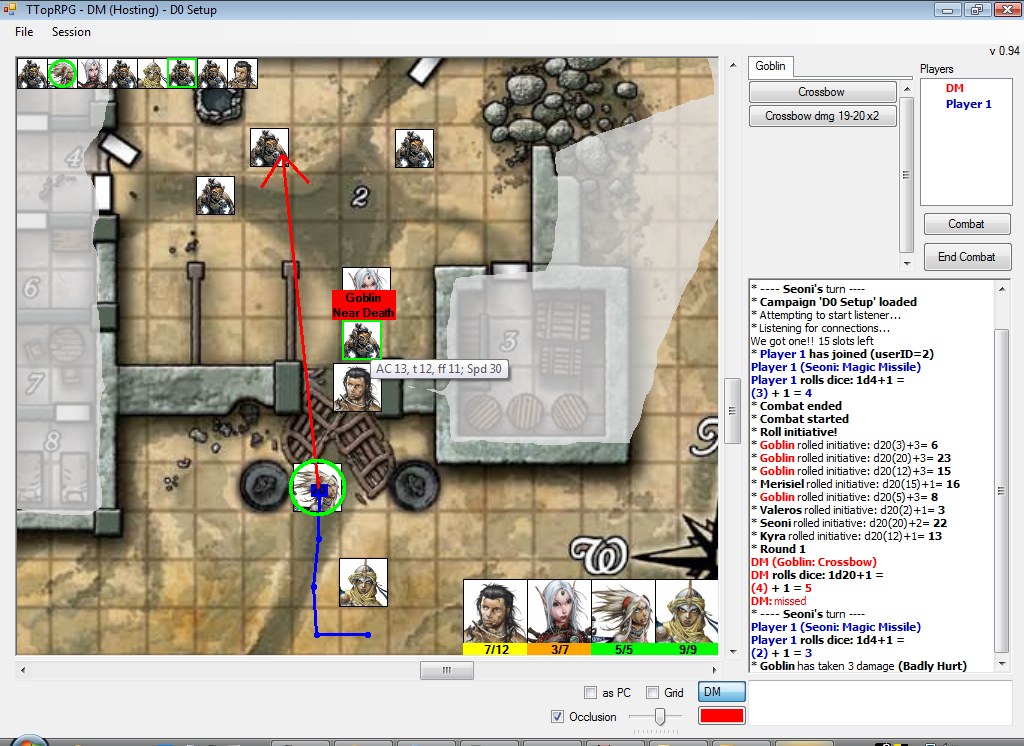
Here's
what the running application looks like from the DM's side. This screenshot
uses the map from Paizo's
free GameMastery module D0 - Hollow's
Last hope. The PC portraits are the iconics they featured in their first
Pathfinder Adventure Path, Rise
of the Runelords.
(Click for larger image)
The quick instructions: Download and run the two required updates below. Then, a little farther down, you'll find a zip file to extract into its own folder.
TTopRPG 2.0 runs using the .NET 3.5 framework and was developed using Visual C++ 2008 Express Edition. It's expected to run on Windows XP SP2 and Vista (no support for Windows 2000 at this time, even SP4). Currently, it uses GDI+ to render its images, but I'll be updating eventually to OpenGL or DirectX.
Don't have Service Pack 2 for Windows XP? Get it here.
It is apparently also possible to get this application working on Mac OS X 10.5.4 using the Parallels virtual Windows environment. I haven't seen this myself, but the user said it works well. So, bonus! However, one user reported that ctrl key and right hold functions don't work (such as ctrl selecting multiple icons and right pressing to erase sketches). So I highly recommend you get a 2-button mouse for your system if one is available (although I don't know if you can disable the system's capture of the ctrl key for second mouse button use).
Note: TTop also works with VMWare on a Mac. To host, you may need to set the network between the Mac OS and Windows OS to 'bridged' instead of using NAT.
Caution: I've had one report of an XP machine that still failed to run my app even after running the 2008 Redist and .NET 3.5 installs. I have also read reports of other machines having more severe problems attempting to install the packages. I assume these circumstances are rare, but I thought it only fair to warn you. As with anything, installing these are at your own risk. But they should be reasonably safe, since Microsoft provides them with the intent to update XP and Vista.
To run the program, you'll need to update your machine to run .NET 3.5 as well as acquire the VS 2008 distributable package:
NOTE: These are now Service Pack 1 versions. If you already installed the older versions, you may not need these, as I have tested the new application with the old versions of these updates and the program still ran fine. However, if you encounter strange behavior, you may want to go ahead and install these.
Additional note: Users of Windows 7 may not need to install the .NET 3.5 package. I believe it comes with .NET 4.0 and should be backward compatible. No promises though. However, you may still need the C++ 2008 Redistributable package.
Visual C++ 2008 Redistributable SP1 Package (required) - usually installs quickly
.NET 3.5 framework SP1 (required) - This can be a longer install - 52 MB download plus up to ~25 minutes of update time with a reboot, depending on the overall speed of your PC/laptop. I recommend you close all other apps while it installs (possibly including AIM), since it may pause during the install and ask you to do so anyway. It starts as a small EXE that you execute, which then connects with another server to download the necessary files. One user from Mexico reported that this application repeatedly failed to connect to the download server, preventing him from updating. I will report a workaround here when one is found.
As of a latest test, the required packages to run TTop will NOT install on Windows 2000, even SP4. The user I spoke with couldn't get the VC install or even .NET 2.0 SP1 installed after updating to Windows 2000 SP4.
After you get the required packages installed, you may want to run Windows Update and grab any latest files your machine might need as a result of installing these packages.
When you're finished updating, you just need the single TTopRPG 2.0 EXE to run the program. Make a folder for it, put it inside, and you're set to go.
Here's the app: TTopRPG.zip (200KB) (v 0.99.033 in zip - use TTopLaunch 1.05 in zip to retrieve latest version from now on - latest is 0.99.128)
NOTE: This zip file includes a TTopLaunch.exe. Use this application to launch TTopRPG. It can check for an update and run TTopRPG. If you create a shortcut for it, make sure its starting directory is the same directory where TTopRPG.exe is located. If you get an index error when Checking for Updates, remove any version.txt and and version_old.txt files in your folder, and try again (for some reason one of my test folders had a blank version_old.txt file that was causing problems).
Just unzip it into an empty folder and run it from there (or create a shortcut for it, just make sure its starting directory is the one you unzipped the file to, since all the campaigns and graphics will be stored there). I DO NOT recommend running it from inside the ZIP file. The program will work, but the files downloaded from the host will end up in a temp folder somewhere, and it's unlikely that running it again from the ZIP file will allow you access to those files, so everything will be downloaded again. Extract it to its own folder!
Another important note: You may want to avoid unzipping the application into a folder that the system may consider restricted, such as Program Files. If you start the program and get an error along the lines of "Cannot access log.txt, access is denied", try moving the application to a less restricted location.
If you are running under Vista, you may need to make sure you run these programs as an Administrator. TTopLaunch failed to download the update for one user until he did so.
WHEN UPDATING AN EXISTING EXE: Usually all you need to do is make sure the new EXE from the zip file overwrites the older EXE in your folder (TTopLaunch now does this automatically). If you are concerned about possible data loss, then I recommend you zip up the ENTIRE folder (campaigns, portraits, old EXE and all) before attempting the update. That way, if something goes wrong, you'll have all of your old data and old version of the program. I usually try to load old campaigns with my latest version to make sure it doesn't mess anything up. But I can't be held responsible for user error, and using TTop is at your own risk.
Here is a sample campaign that illustrates the basic ideas behind setting up a campaign: Sample 1. Unzip this into the campaigns folder of the TTopRPG folder (you may have to run TTopRPG once to generate the campaigns folder). The Sample 1 Details.pdf file contains the details of the campaign itself. You should have the latest version of TTop before loading this campaign.
No portrait or map graphics are provided with the application. Eventually I will provide some sample graphics (free to use, since they are mine) and a campaign that will help to introduce you to the app's functions.
NOTE: For testing purposes, you can run a single host and single client using the same exe. But DO NOT run two hosts or two clients from the same folder, or file conflicts will occur and one app will likely bomb out!
If the program fails to run at all, the problem could be a number of possibilities:
- If you get an error saying the application failed to start because its configuration is incorrect, then it's likely you still need to properly install both the VC 2008 Redistributable package and .NET 3.5. See above.
- If the application simply refuses to run with an exception error, there is another problem that at this point is beyond my control. I've run into this problem a couple of times on some machines and I believe I've fixed the problem. Recent experimentation has revealed that it is related to some machines immediately calling the SizeChanged routine for the main form once it is initialized with all its controls. The SizeChanged routine adjusts all the controls as the form resizes, including an override for the chat entry control to allow up/down recall of what you type. This control isn't there yet when these machines call SizeChanged immediately, so the application would crash.
- I recently upgraded my 2008 Express development environment to Service Pack 1. I tested the newly compiled application on a machine with the original VC++ 2008 and .NET 3.5 framework, and everything appeared to work fine. However, if you get odd behavior, you may need to grab the SP1's. The new VC Redistributable and .NET 3.5 SP1 downloads are above.
If you Host but no one can connect:
- The application exclusively uses port 26010. Make sure you are allowing that port through your firewall. The application also exclusively uses TCP, but you may want to enable both TCP and UDP through the port, just in case.
- Your anti-virus software may also be blocking ports. Kapersky prevented this app from hosting during some testing. Try disabling your anti-virus software or configuring it to allow port 26010 TCP/UDP.
- Visit http://www.whatismyip.com/ to see the IP address for your machine. Provide this address to the players to use as the connection address.
I wrote up a more detailed discussion about Connection Problems at TTopForums.
- Separate network "channels" for file downloads and game events. This means that while your client is requesting graphic files from the host, you can still chat, roll dice, move figures and play the game. High-speed internet users won't see much of a gain, but those still on dialup won't have to wait for a long map download to see game events taking place.
- Add figure portraits and maps while you play! The application supports BMP, JPG, PNG and GIF graphics for now. Small graphic files are preferred for all the figures. Maps are expected to occasionally be large. Clients receive new PC portraits in their selection screen as you add them! Extensive use of PNG and BMP files will require longer downloading. JPG recommended mostly.
- Uses GDI+ to render graphics. For now, no special 3D card requirements are necessary to play, although slower machines with slower graphics cards may notice some slowdown, especially on very large maps.
- Displays PC portraits along the bottom row of the graphics area, showing current and total hitpoints as well as indicators for nonlethal damage and temporary hit hoints, and health status (color). Mousing over figures on the map itself also shows health status without revealing hit points on creatures.
- Move figures around the playfield to show their position to other players.
- Integrated dice roller ("/roll 5d8+5+2d6", etc. for usual dice rolling, "/wr, /wr8, /wr9, /wrx n" for nWoD). Macro buttons supporting multiple commands can also be set up.
- Additional indicators like a movement path or ruler with a distance value (supports x2 difficult terrain movement), attack arrow, markers, and spell effect areas help provide vital information for the game.
- Host can hide or reveal any part of the map using a path tracer that allows any size or shape (up to a certain complexity, more than enough for what you need).
- Clients keep a binary archive of downloaded files for each campaign so they won't have to request the files the next time they connect!
- Optional 5' square grid system that is adjustable while everyone is connected.
- Figures track name, armor class, speed, hit points (and temporary), damage (and nonlethal), initiative modifier, visibility, and graphic for the figure's appearance.
- Sketch mode for drawing lines on a blank map. This allows setting up on the fly maps in case you don't have a particular map graphic ready.
- A combat tracker allows you to advance the turn automatically. It reports a new round and expired spell effects which you can add. It allows you to set the status of a figure to normal, readied, delaying or out of combat (automatically skipped). It also allows a figure to be set to go just before the current figure (to trigger a readied action) or to go after the current one (to stop delaying). You can also move figures in the combat order as you wish, but setting a particular icon as the current one without treating it as a triggered action or ended delay is not supported. Icons are displayed along the top of the map to show initiative order.
- Icons now have "feature" and "locked" options, allowing you to put dressing on maps at the floor level.
- Icons now update 4 times a second on other machines when being dragged. A dragged distance path persists on the dragged icon for 4 seconds.
- Table lookup now supported. Here's a sample table. Place it in the scripts folder (run the program once to see it) and call with /table "Confusion 3.5" d100 (macro also supported). A hosted session will use the host's files only.
- (Advanced) Lighting! As the DM, you define the surfaces that generate shadow or darkness. You can also assign icons to possess darkvision, low-light or both. Highlighting the icon causes the scene to light the way that icon would see it (lighting only, not line of sight). Light sources can be attached to icons so that lighting adjusts as icons are moved. Many surfaces with several lights can have a slow frame rate, so slow machines will run best with shadowy ambience (less to render) instead of darkness ambience. Setting ambience to full light disables lighting. Here are a couple sample pics. And what it looks like to define the surfaces. Here is a youtube video showing how lighting looks live. New feature allows you to define shadow walls as areas of darkness so that you can have areas requiring lighting when the rest of the map is in full daylight or shadowy, such as a cave on the same map as a town.
- Proxy hosting - for those GMs who have trouble allowing others to connect to them (due to being behind a difficult firewall or complex network), I've added the ability for a player to serve as the session host. This way, someone in your group who provides easy access to their connection can host while you GM through a client connection. Communication in some cases will be noticably slower, but it works.
- Map Builder! Similiar to MapTool's shape drawing functions, this allows you to make colored and textures maps either before or during play. Sketching is still a viable way of creating maps on a blank sheet when you don't have a nice jpg available, but Map Builder gives you the opportunity to make these maps with a little more presentability. You will need your own textures and PNG images if you want pretty maps. I recommend textures and PNG images that look good at 50 pixels per 5' or so. Try to avoid using huge graphic objects, especially if you plan to place a lot of them. Here's a sample result. One Dec. 20, 2008, I mentioned I might add this feature, but I didn't promise when. On Jan. 7, 2009, I released it. That's how I roll.
- Visual Aids - allows you to show text or graphic visuals to players in a separate draggable and resizable form. Multiple visual aids can be open at a time. When you first send a visual aid to a player, it appears as a button at the bottom of the screen. Clicking the button opens the visual aid. Later, the player can open it again from a list in the lower left corner of the map. If you send a visual aid to a specific player, it forces an alert on that aid, and will remember to send it to that player again if they reconnect during the current session. Only visuals made public will automatically be sent to players when they connect in later sessions. On the GM's machine, visual aids are separated by folders in the upper box. Players only see visual aids names in their list.
- Player chat channels - this is a new addition. Type /join channelname to create a channel. Others can join it by typing the same. Typing /leave inside a channel leaves it. All text from public channels are logged in public_channelname files, even if you aren't joined (this only works if you are connected when the channel is created by anyone, or after you join it). This is currently in beta and was only added as a player request.
TTopRPG was designed around what I wanted in a tabletop emulator. Hit point statuses of creatures are available at a glance, and combat tracking is fairly complete. An older version of this application was used to track the combat involving the defense of a keep. The fight lasted 30 rounds in total, and the application handled it very well. The same combat was attempted using this latest version, and despite one strange lockup which the application fully recovered from (allowing everyone to reconnect and continue), it ran fine. As you conduct your campaign, you'll still be required to have your own mastery of all the participants and spells, since the application won't handle all of the deeper details for you (resistances, damage resistance, spell results, etc.).
That said, using the emulator will make it clear that it is very geared towards combat, and there may be a degree of pulling people out of the roleplaying as the emulator keeps combat variables very visible. So far, my players haven't noticed a real problem with this, so it really depends on the users.
Other notes
Sharing your campaign with others
If you want to share your campaign with others, you usually just need to zip up the folder with the campaign's name, and have others unzip it into their campaign folder. This of course assumes that they don't have any campaigns by that name already. A couple of important notes about this, however:
- Even though all campaign specific monster graphics and macros are stored inside the campaign's folder, the common Character and Monster portraits and saved Character macros are not. So, if you plan to share a campaign with others, make sure you are using only campaign specific monster graphics for all your icons (using the portrait manager, Copy all the common portrait graphics you used on icons into the Campaign Monster list, and assign all of the icons in the campaign to use those instead). You could send the other users your portraits folder as well to make this easier, but this will overwrite the index files in their portraits folder, causing them to in effect lose their common portrait library!!
- In order to share Character macros, you're probably best off just loading those into the Character slots on the macro control in the program, then saving the campaign. That way the PC macros will load when the other user opens the campaign.
- If you've tested the campaign by Hosting and Connecting to it from the same folder, you'll have archive.idx and archive.bin files in the campaign folder. Delete these before you zip it up.
- Older versions of TTop will refuse to load campaigns saved with a newer version. TTop will tell you what version you need (that version or later) if this happens.
If you are setting up a campaign and you plan to use it multiple times, here's how you can re-use it:
- After you get the campaign ready to run, Export it. It will create an Exported campaign with the same name (you can make modifications and export it again later to overwrite the earlier Export, but don't do this if you have started your actual campaign!)
- Every new campaign you want to use it for, create the new campaign from the Export
OR
- Set up the campaign for running, but just save it off
- Every new campaign you want to use it for, create the new campaign off from the existing one (Copy Campaign)
Sadly, if you've set up a campaign and have started using it in an actual session, there is no way to restore it to its original form, short of going through every map and changing everything back.
I've tested TTopRPG 2.0 with my own secondary dial-up connection, and it seems to work fine. However, there seems to be a repeated timing out problem, but I've added some wake-up messages that help jiggle the connection when it happens. Usually, the connection recovers during the second timeout.
A typical 1 meg-size map with all relevant data usually arrives to dial-up users in about 5 minutes with a decent 50k connection. Most maps are smaller than that.
I do NOT recommend that dial-up users host with a large jpeg map. You have to send that map data down to all users, and that would take a while on a dial-up hosting connection! Sketch maps should be fine. And make sure your icon graphics are decently sized (no larger than 10k each or so).
Current bugs
- Some machines exhibit inadequate region rendering, meaning the fog of war (occlusions) can appear corrupted. This is being looked into.
Coming soon
- Sketch erasing splices line segments instead of only dealing with points (so far dealing with only points has been enough)
- If you set an icon's total hit points to zero, it will appear as a normal object with no hit point status when highlighted. This works well for showing NPCs, pit traps or corpses when you don't plan to track any damage to them.
- Making an icon invisible is the best way to hide it from the players. Players would still be able to highlight a visible icon that is completely hidden in an unrevealed part of the map. Also, if your intent is to show an icon moving out of the visible battlefield into a hidden area, trace the visible path out of combat, but don't automatically move the icon there. Instead, make the icon invisible, then drag it to the end of the path. This way the players know the icon has left the area, but they can't tell where it went by highlighting.
- Hold SHIFT to show the hp status of all visible icons (host or player)
- If you are hosting and want to conceal an icon's drag path while moving it, hold SHIFT.
- Invisible icon drag paths will not be visible to players (even if you make the icon visible while the last dragged path is still there), nor will plotted paths started on an invisible icon. When the path is partially transparent, it's invisible to players.
- There are
a number of keyboard hotkeys on the map:
- When
nothing is highlighted:
- A places an attack arrow
- M places a marker
- P or S begins a path plot
- R starts Reveal Mode (host only)
- H starts Hide Mode (host only)
- When
laying an attack arrow:
- Esc will cancel it, as will right clicking
- When
an icon is highlighted:
- Double-click will modify it
- Enter will modify it
- A will place an attack arrow beginning on the icon
- P will begin a path plot with the icon highlighted (see below)
- I rolls initiative
- F will find it (as a player, you can highlight a PC portrait and hit F - it will find your icon on the map as long as it's visible)
- Delete or R will remove it (host only)
- V will toggle its visibility (host only)
- H will heal it (host only)
- D will damage it (host only)
- E will access its Effects list (host only)
- When
a marker is highlighted:
- Delete will remove it
- When
in plot path mode:
- S starts over
- Esc or C cancels
- Backspace or B backs up one segment
- Enter, P or D finishes the plot
- When an icon was highlighted at the beginning, M, space, Z or X will finish the plot and move the icon to the end
- Holding shift will cause the next segment to represent difficult x2 terrain (purple)
- In Reveal
or Hide mode (host only):
- R and H will switch modes
- D, Enter or Esc will leave Reveal/Hide mode and return to normal
- When
an infobox is highlighted (host only):
- Enter will modify it
- Double-click will modify it
- When
a spell effect is highlighted (host only):
- Enter will modify it
- Double click will modify it
- Delete will remove it
- V will toggle its visibility
- While
drawing out a region to reveal or hide (host only):
- Right Click will cancel the draw (in case you make a mistake while drawing it out)
- When
nothing is highlighted:
How do I
host?
TTopRPG hosts through port 26010. You have to forward this port from your
router to the hosting machine. Only the machine serving as the session host
needs to do this. See this
thread at TTopForums for more details.
When I run TTopLaunch and click Check for Updates, I just receive the message 'gamemodel.com, ttoprpg.com and ttoprpg2.com are not accessible'.
Try running both TTopRPG and TTopLaunch as admin (right click the exe and select Run as Administrator). Some machine setups don't have you logged in as an admin user by default, and this may cause you to lose access to certain aspects of applications.
- v 0.99.128
- Created chat channels did not take on the same font size as the other
channels, Changed MapBuilder Show Indicators menu option to Show Adjusters
for clarity, Mass heal and damage now supported for GMs (select all the
icons you want to heal or damage), Changed wrong version login message to
recommend TTopLaunch 1.05 instead of 1.02 (everyone should have 1.05 by
now anyway), Enlarged Die Roll checkbox was enabled in client Settings screen,
Fixed a couple of bugs causing the map to render itself far too often while
moving the mouse over it (introduced by the map rotation point code), Show
round number in chat when combat is ended, GM Rolls Private checkbox now
available at bottom of main form, Improved tab order on Connect dialog,
Improved support for large fonts on Settings dialog
- 0.99.127 - Visual aid window now minimizes in agreement with larger font settings, Further limitation on /sr rolls: explode cannot be 1, MapBuilder shapes still showed axes when cancelling a drag, MapBuilder image, rectangle and ellipse now supports a movable rotation/resize center (helps lining up image grids with TTop grid), Added ability to make an ellipse or rectangle into a circle or square or restore an image's original ratio, Added ability to zero the angle on a rotated shape, If hold SHIFT while rotating an object, rounds the degrees to a whole number, Fixed bug that occasionally made MapBuilder image transparency become zero when cancelling a resize, Added map folders to keep maps more organized - folders are NOT created on the disk, Added setting to display larger text for die roll results for /roll, phrase, /se and /wr, Icon effect notes max width now driven by font size to make more compatible with large font systems, Added ability to add notes to markers, MapBuilder shapes now allowed minimal access in main map mode via indicator (visibile, transparency adjust, 90 degree rotation), If a plotted mapbuilder shape is backspaced to erase the first point and saved, the shape is discarded along with its indicator (it's no longer accessible, anyway), Fixed bug potentionally causing an invalid packet to be sent to clients when an exploding die roll (/sr, /wr) returns a large result, Adjusted border of flare to appear more natural on resized maps.
-
v 0.99.126 - Force table results to 400 characters max, Hit W in light mode to add a new wall, Hitting F while plotting a light wall will flip its facing, A plotted light wall's facing will be the facing for the next wall plot, Copy Macro now available - one version copies selected macro and acts like an insert, another puts it on the clipboard to paste anywhere you like, Paste Light and Paste Shadow Wall now notes ctrl-V as the hotkey instead of ctrl-C, Adjusted movement of controls on Macro and Place Icon dialogs so that systems using larger fonts don't offset things strangely, Background of chat entry changes with chat mode (OOC/in-character), Chat log background can be set to shades of gray, Can remove combatant from combat using map right click menu instead of combat form, Optionally send larger keepalive packets to help with mysterious dropouts, Support success and exploding rolls in general (/sr 5d6e4s5 will roll 5 d6, explode 5s and up, and count 4s and up)
-
v 0.99.125 - If a graphic was tagged both a monster and common portrait, sometimes would not appear in player icon modify screen after requested from host, If map is names with a &, & didn't appear in right click load menu, 14pt and 16pt chat text size now available for those of you projecting TTop on a large screen (not practical for screen use), Setting now available to place session date at end of log files (GM Settings), FATE dice now supported (use f as the die ex. 4df, 4dF, df, etc.)
- v 0.99.124 (6/22/2012) Found slight bug when rendering black fog of war and explored areas for a player. Transparency should now be more consistent, Now shows multiple local IPs if available for port forwarding, Independent darkvision lightsources were rendering as square. They now render as circles, When tag arrows (marked, quarry, cursed) are < 0.001 long an attack arrow point is rendered instead, If archive validation fails, in-memory registry should be wiped, When Connect as GM to proxy host, was not populating username on OOC button properly, Remove All Markers and Remove All of My Markers options should not appear if markers are only flares, coGMs were mistakenly not given the menu option to modify PC icons even though hotkeys worked, Move Combat Counter Back One wasn't working properly in all circumstances
- v 0.99.123 (5/9/2012) Corrected a rare potential bug allowing system to mistake a guaranteed packet for a critical-now packet (guaranteed IDs now range 1-16383 instead of 1-32767), Added more information to the bad login packet message for the GM, Remove spaces from server names entered in the Connect dialog, Fixed bug that caused a crash when activating map chunking while GMing through a proxy server, Show local IP address when hosting for port forwarding, Suggest ipchicken as an alternate external IP site (whatismyip is putting stupid spaces in the IP), Reset timeout count to zero on server socket when connect
- v 0.99.122 (4/1/2012) - Added white center to map flare, added Home/End hotkeys to adjust MapBuilder transparency, fixed negative number display bug in chat (was always off by 1), and fixed a lockout bug in the Info Box dialog (if you had infoboxes on the current map then switched to a map with no infoboxes, the title of the last info box would still appear in the dialog, and if you changed it, you caouldn't apply it or undo it)
- v 0.99.121 (2/11/2012) - Added map flares - just shift-tap the map quickly to drop one.
- v 0.99.120 (1/29/2012) - added bias analysis to /dicestats command
- v 0.99.119 (12/26/11) Chunking now occurs over time to prevent rendeirng lockout and network timeouts, and extra prepping uses 20% more memory but speeds up zoomed out rendering (steps 1-4).
- v 0.99.118
(12/18/11) Added gmOnly flag to MapBuilder shapes to support Forstor Nagar,
Now supports selection of .jpeg files in addition to .jpg files when adding
graphics, " added to list if illegal characters in campaign name and
icon name, made illegal characters in modify PC icon screen name field,
rename macro tab, and chat channel names more rigid, Setting to allow map
chunking for faster zoomed in rendering of large maps (high RAM use, slower
map loads), Removed bug that prevented tracing a box or other simple shape
with a diagonal longer than 4500 pixels
- v 0.99.117
(9/7/11) Added Segment counter to combat round counter (2-10 segments supported)
- for games like Alpha Omega, Support for die roll phrase in Init Mod of
Icon dialog to support games like Alpha Omega, Fixed small bug that might
complain about the map changing when advancing combat turn with Ctrl-Space
after loading campaign
- v 0.99.116
(6/26/11) Ctrl-space now advances the combat turn. GMs rejoice! And Main
and inner icon facing support for other game systems (enableable as a Player
Freedom and accessible by co-GMs)
- v 0.99.115
(5/16/11) Toggling shadow wall mode while plotting no longer recalculates
surrounding lights (will recalc when done plotting), Dicestats output expanded
to count d20 rolls when rolled 50000 times, and rolls with most repeated
in a row, Modified the random number seeder (the random number generation
code is the same, just the seed init is more varied. No noticable difference
in rolls), Fixed bug where saving a map with an area effect attached to
a large-numbered icon will cause a reload error (oops!)
- v 0.99.114 - (4/15/11) .99.114 Remember light mode of wall to avoid having to set light to darkness again after plotting a prior darkness wall, Allow toggling of wall mode using L key while plotting, Map now zooms in and out with the + and - keys, Only allows values between 0 and 32767 entered in heal and damage dialogs
- v 0.99.113
(10/30/10) Snap to grid now works on hex maps, uses sizes 4 for medium,
8 for large, 13 for huge, 18 for gargantuan so icons don't overlap so badly.
TTopRPG.zip now contains TTopLaunch 1.05 which checks contents of downloaded
files to help capture hosting problems and has improved site testing, TTopRPG
also coded to check contents of downloaded files to help prevent errors
when retrieving latest TTopLaunch
- v 0.99.112 (10/21/10) Hex map support (no area effects, reshaping icons, or snapping to grid yet), fixed a bug where blank maps when saved may have added an extra mapGridY line at the end of its section in the mapIndex file. Load the map and save it again to fix this.
- v 0.99.111 (9/26/10) Now supports Broadcasting an Infobox to a single player, detects cancel on a various requested inputs - no longer complains about empty values, European users running TTop from inside a pathname with Euro characters would error out when logging took place
- v 0.99.110 (8/29/10) .99.110 When dragging a macro button, if the original text was bolded or italic, the dragged button only showed the basic text style - Now supports removing all macro variables with a single menu selection
- v 0.99.109
(8/22/10) If an icon has taken NL damage, the icon tooltip and detail text
now displays both NL and hp for clarity.
- v 0.99.108 (8/17/10) Creatures that die at 0 hp didn't show an X on their init icon when they reached 0 hp remaining, and players would sometimes be assigned coGM when they aren't.
- v 0.99.107 (8/13/10) Fixed constant popup message when toggling visibility on an icon while not hosting, fixed hidden Marked Arrow option
- v 0.99.106 (8/10/10) Small revision very few will notice
- v 0.99.105
(8/5/10) Added warning message when network loop isn't called for more than
a few seconds - to help debug disconnects, One XP user complained about
exceptions when a player chatted while he was browsing for a graphic. This
has been resolved, Adding co-GM functions - So far a co-GM can only move
damage and heal all icons, roll their initiative and toggle their visibility,
TTop now guides you into the Load Campaign menu if you try to hose without
a campaign loaded.
- v 0.99.104 (5/29/10) Reduced the size of markers from 5' to 4' so they don't prevent icon highlighting so much, Added Player Freedom Setting: Damage and Heal PC Icons. More to come, Added setting: Hide Monster Damage/Heal numbers - when a monster takes damage or heals, the exact amounts are hidden from players, Fixed small bug that made combat timer scroll off the screen while the main form is resized
- v 0.99.103 (5/4/10) Remove all Markers (GM only), and Remove My Markers (everyone) functions added
- v 0.99.102 (4/16/10) Fixed potential bug with combat timer - if Settings are open with "abc" in blank and player joins when it's a PC's turn, it caused an exception. Also, combat timer now disappears after 30 seconds after reaching 00:00
- v 0.99.101 (4/13/10) Added a combat timer (kind of sloppy, but it works)
- v 0.99.100
(2/13/10) - Fixed a bug preventing the GM from highlighting monster init
list icons when monster inits aren't shown to players, Init icon list now
resizes with vertical size of map window so that the init list on high resolution
systems isn't so small
- v 0.99.099 Lighting presets added to Add Light menu (torch, candle, etc.), new Setting counts squares in Path Plot instead of accumulating 5 feet increments, supports clearing of text in chat by right click menu or /clear command
- v 0.99.098
- (1/30/10) When a visual aid is forced new or active from the host alert
text will appear in the chat area, and counting square algorithm changed
for difficult terrain - Since normal movement diagonally is 5 10 5 10, x2
and x4 movement is now 10 20 10 20 and 20 40 20 40 respectively instead
of 15 15 15 15 and 30 30 30 30.
- v 0.99.097
Now displays helper name above chat entry only when in character, Supports
more open visual aid descriptions (up to 800 characters and carriage returns
allowed)
- v 0.99.096 Gives InfoBox dialog focus more aggressively when it opens, While plotting shadow wall and plot shape hitting BackSpace removes last point, Plot shape and shadow wall plot show points remaining (200 max for shadow wall, 500 max for shape), Plot shapes can now be finished with Esc C Space and Enter, Shadow wall plots can now also be finished with Space, Fixed invalid packet problem with very large circular area effect with very large inner size, Fixed chat font size - now resizes chat entry area again, You may now remove a macro variable from tabs
- v 0.99.095
(11/8/09) Fixed bug causing chat to lose focus if someone updated a macro
in your currently selected tab, Added network keepalive debugging to settings
(for me), Info boxes now contain GM and player content. GM content remains
private. The symbol is coded for content - white box for player, red i for
GM, and
Bug causing invalid packets on Campaign name = 32 chars fixed
- v 0.99.094 (11/1/09) - TTopRPG now also polls ttoprpg2.com for the latest TTopLaunch when downloading via the Resources menu. TTopLaunch 1.03 now polls ttoprpg2.com for TTopRPG updates. This provides two places for TTopLaunch to grab updates and should reduce the chances of halted games due to downed servers.
- v 0.99.093 - (10/31/09) Fixed bug revealing Combat and Start Combat buttons when toggling fullscreen as a player, Added support for character and monster specific variables that affect macros (use [!varname=default] in the macros or chat commands) - back up your campaigns!!, Inner size of circular area of effects supported (auras) - can attach area effects to icons now too, Tooltip text no longer shows when highlighting icons but still shows when highlighting init list and portraits. Tooltip text also hows on icon for first plot point.
- v 0.99.092
- (10/22/09) ctrl-A in chat selects everything in the chat entry for quick
delete or copy, ctrl-L on map locks PC icons (also in Settings)
- v 0.99.091 - (10/17/09) Players that disconnect and reconnect will be given back the channel tabs they had visible (host tracks which tabs you joined and left), Players now get an I'm Done button in combat that they can click when their turn is finished (it doesn't advance anything, just tells the GM you are done), Right click menus available on channel tabs (leave, invite), Player list highlights player names according to who is joined on the current channel tab (Main always highlights all)
- v 0.99.090
- (10/11/09) You can now toggle the shape indicators in MapBuilder with
the Z key, Corrected bug showing an X on an icon with zero hitpoints no
damage and dead HP = 0, Ctrl-O in chat entry toggles OOC switch, /invite
playerName now works to pull players into a channel (invite message appears
in the channel as well)
- v 0.99.089
(9/30/09) Added font size feature to chat area (right click to access),
Creatures that die at 0 hp will now show an X on the icon at 0 hp, F11 now
toggles fullscreen map view (mostly)
- v 0.99.088 (9/7/09) Minor sound support added (.wav only for now. Keep them small. They play at FULL VOLUME so help your players set their volume, and find a free .wav converter - see announcements).
- v 0.99.087
(9/5/09) Public GM rolls and visible monster stats now supported in Settings.
Sound interface being worked on.
- v 0.99.086
(8/29/09) Allows setting of dead HP to support PFRPG, Option to allow shadowed
non-ambient light sources to illuminate each other to support PFRPG (warning
- it's SLOW!), Added suggestions for files to use for graphics since new
users seem to prefer BMPs which are too dang big
- v 0.99.085 (8/5/09) Exception handling added for bad image files (if you try to set up a bad image file, the file is now refused instead of crashing. And if a bad image file somehow gets into the system during a session, the TTop intercepts it and refuses to load it, leaving it blank).
- v 0.99.084 (8/1/09) Bug adding New PC tabs fixed - buttons now disappear again as they should
- v 0.99.083
(8/1/09) Occlusion default color moved to top of selection, Macro quick
folder change added (right click macro), Move all macros to other folder
added, Move macro folder left and right added
- v 0.99.082 (7/31/09) MapBuilder freehand bug fixed.
- v 0.99.081
(7/30/09) PC checkbox cleared when placing and pasting new icons to avoid
monsters showing up accidentally in PC portraits, Occlusion color supported
(white, gray, black, linen, almond), Macro sub-folders now supported (additional
functionality like arranging folders, one-click button move to another folder,
and moving entire folders to another to follow)
- v 0.99.080
(7/25/09) Right click menu options now available for Light wall indicators
(V only), Right click copy/paste menus available for Lighting (lights only)
and MapBuilder (Images, Ellipses and Boxes only), MapBuilder Copy message
reflects what was copied, Reveal/Hide functionality now has a panel with
Freehand/Box Reveal/Hide/Explored and Done buttons (still need to right
click to Reset), You may now copy/paste shadow walls (helpful when you have
to set up lots of pillars, etc.) and move an entire wall with the SHIFT
key
- v 0.99.079
- (7/18/09) Corrected note about GM phrase die rolls not being private (they
are now), Show disabled menu item (in combat) Move Counter->Set This
Icon as Current Combatant to make options more clear, x4 path movement now
supported (Alt or SHIFT = x2, both = x4), Added port number to hosting message
and proxy hosting clarified (GM must connect first), Added visibility options
to right click menu to make it clearer that V also works on lights and effects,
Added copy/paste options to main map menu (MapBuilder to follow)
- v 0.99.078
- (7/9/09) Bug with colored macro buttons on "classic" interface
fixed (colors would affect buttons in same position in other tabs), Added
option to move combat counter back one
- v 0.99.077
- (6/25/09) Fixed bug with tells (content was being chopped or repeated),
all GM rolls including any phrases with die rolls show up as '<name>
rolls dice...' again - whispers however will show rolls
- v 0.99.076
- (6/24/09) Added Always Show Name to complex macros so that text-only macros
still show their name in chat when they are clicked, Warning on Load and
New campaign removing the sample macro tabs (some users might create macros
then create or load a campaign, losing the macros), Modified /help list
slightly, Complex macro validation bug fixed (allowed you to empty complex
Operation and click OK without an error)
- v 0.99.075
- (6/21/09) .99.075 Cleaned up some potential reference bugs with macros
(rt click menu operations could apply for removed macros or characters if
removed before menu clicked), Complex macros now supported (multi-line,
labelling options, folders can be entered but don't display yet), Dice rolls
now appear in the current channel (/join), Whispers now appear in all channels
(does not cause * to appear on tab names), Supports parameters in chat lines
- [?varname=Def] asks for varname and defaults to Def if you just hit ENTER,
Fixed potentially disastrous memory leak (now reuses buttons in macro list
rather than wiping them and making new ones when a different tab is clicked)
- v 0.99.074
- (6/18/09) Additional highlighting added for highlighted (optional) and
ctrl-selected icons, recurring [b] and [i] in chat text no longer cancels
the other mode (bug), simple OpenRPG style chat rolls now supported ("Grunk
hits AC [1d20+5] for [2d6+7] damage") - also now supports whispered
rolls "/w GM Fort save [1d20+8]" - NOTE: these are NOT private
rolls for the GM - does not yet support parameter variables or quiet mode
as with OpenRPG. Macros only support 32 charactes for now. Macro functions
will be expanded in the future.
- v 0.99.073 (6/6/09) Links to download page and TTopForums added to Resources menu, Now supports downloading of newer TTopLaunch
- v 0.99.072 (6/6/09) Added some colored highlighting to MapBuilder to help notice when larger objects are selected, Save Campaign question made more verbose (makes it clear you'll lose map changes if you select No), Link to TTopForums in startup message
- v 0.99.071 (4/29/09) Added some graphics to right click menus for a little clarity (save, load, delete, modify), Visual aid description text with carriage returns corrected if pasted
- v 0.99.070 (4/22/09) Resizing bug with subchannels fixed (More and scrolling to end now happens when it should), Fixed invalidate packet bug in notices of associated tabs (MSG_NOTICE messages), Blanking out TempHP in the icon form no longer causes an error (bug), Recent attempts at optimizations kept macro tabs from appearing when first one was added (on Load or New) - this has been fixed
- v 0.99.069 (4/19/09) Now makes lunch for David, Temp files are no longer used - memory streams have taken their place, Player chat channels now available in beta form (just /join and /leave commands available, channel contents are also logged)
- v 0.99.068 (4/11/09) Added session host/player connect section text to html logs to match txt files, If a die roll is not random (/roll 20 or /roll 1d1+19) places *Not Random* at the end, Carriage returns removed from text pasted into chat
- v 0.99.067 (4/10/09) Macro button redraw routine now only called when needed (when a change occurs in the currently selected tab list), New and loaded tabs automatically selected (GM only), An icon's darkvision is deactivated while rotating its arc light source, R key added as way to Remove markers and area effects (since Delete key on Mac isn't properly captured), Clicking Cancel on Settings form no longer restores old values for players (bug), In proxy session GM machine now prioritizes initial messages to server to prevent player name loss in list, Campaign logging now also writes to an html file to capture colors (does not capture bold or italics yet), Hotkeys and extra menu options for removing area effects and markers added to right click menu, Players now have an indicator next to their names while using the pathing tool (forcibly cleared on new map), More bug squashing in timing and method of proxy disconnects (player server and GM), Turn Undead output now formatted correctly in log files
- v 0.99.066 (4/5/09) Light rotation cleaned up a bit (start and stop with L key, doesn't send when not moving, not all messages guaranteed anymore, better form tab order, etc.), Modified lights sent from host only recalculate shadows if certain elements of light change (position, radius, type), Visual aid interface changed to a tree list with graphics (players only see a simple list)
- v 0.99.065 (4/2/09) Support for spotlights added (arc degrees 0 = circle, set light direction using L on light source or attached icon)
- v 0.99.064 (4/2/09) Small bug with button list resizing fixed (when at the bottom of a long list and gain another column, scroll bar value wasn't adjusted correctly), In MapBuilder selectfill form selected color and color history now appear as selections in custom color form, Rclick on map area now works for general Mac users (ctrl key is captured on PCs for another purpose and was interfering), SHIFT in sketch mode activates erase for Mac users (no ctrl selecting icons for you yet though!), Visual aid description no longer allows line breaks (apologies to those that put in line breaks and got errors when it loaded)
- v 0.99.063 (3/29/09) MapBuilder shapes with textures will now render as white on clients until texture downloaded, You can now resize the chat window and macro list (to a limit)
- v 0.99.062 (3/26/09) Character macros now sent down as one packet to speed up communication and help avoid timeouts with connect
- v 0.99.061 (3/26/09) Alt-click to use ruler (acts like path, lasts for 8 seconds, GM's is invisible to players)
- v 0.99.060 (3/25/09) Now sanitizes grid data input from file in case international bug from before resulted in bad data (mapGridX=100000.0, etc.), Added triggered action end delay and add round timer options to combat status quick-menu, AC and Speed info now shown under the icon to help avoid the tooltip text blocking the information underneath, Supports nWoD dice rolling (/wr /wr8 /wr9 /wrx 25 or less)
- v 0.99.059 (3/22/09) Alert visual aid buttons are now cyan - minimized visual aid buttons remain gray unless alerted again, Player placing a marker no longer causes map highlight when GM is performing operations on the map (caused unwanted highlighting), Player no longer forced to highlight map objects because of host update while placing attack arrow, dragging map, or icon, All modified visual aids will now change the active forms on player screens (previously, only "public" aids would change), Visual Aid text now allows hyperlinking
- v 0.99.058 (3/21/09) Now supports placing objects past pixel +/-3276.7 in a map without crashing on reload (but not recommended to have maps that large), Visual aids now supported - text or graphic - can be made public to all or sent to specific players during a session
- v 0.99.057
(3/19/09) Put international interpretation of . and , in place - should
display ,'s for the Euro folks in files and on screens as well - fixes grids
being off on reload
- v 0.99.056 (3/19/09) Combat indicators now appear behind icon captions, quick alias - /a "Store owner" May I help you? -> Store owner: May I help you? (GM only), quick emote - same except /aem or /ame, At long last right-clicking a macro tab selects it!, Attempting to fix a potential international problem on systems representing floats with , instead of ., Visual aids are being worked on
- v 0.99.055 (3/12/09) Right click cancel operations (adjusting map shape, attack arrow, redefine map edge) where right lift occurred outside of map area caused interruption - this has been fixed, Ok/Cancel buttons added to grid slider adjust screen for clarity, Fixed loop bug involving deletion of multiple selected icons, Lighting bug fixed (in my attempt to optimize, I left out the routine that subtracts darkness walls from close light sources. Things were fine as long as only one light source was involved. Once two came into play, the shadowed area of a light source on one wide of a wall was fully illuminated by a light on the other side of a wall, which was wrong), You may now enable/disable lights in LIGHTING mode with the V key
- v 0.99.054 (3/11/09) Icon Say changed to Icon Quote (hit Q instead of S), Hit S on icon to bring up its combat Status ("Out" only allowed on those that have rolled init), Typing /table with no params on host lists available table files, Effects of size 25' 35' 45' and 55' now supported to assist with 4e blast and burst areas, Spell effect timer terminology changed to "Round Timer" throughout program, Icons with 0 total hitpoints no longer show hitpoints under the icon when highlighted in combat, Selection rectangle now maintains its position accurately when map is zoomed around, Lighting system optimized (much improved for 4e, slight for 3.5), Clear all fields button added to icon form (place and modify single), While in combat you may now set any icon to readied or delaying - this allows a single icon in a group sharing one init roll (such as minions or mooks) to delay or ready actions and move into the init lineup easily, Pressing I on an icon that has already rolled initiative in combat allows you to adjust its init roll, Map scroll change values increased (small change is now 50 pixels, large is 400 pixels), MapBuilder quick-controls now appear behind the mouse as it moves (no more accidental control grabbing when you just want to move a shape - or less anyway), Left and right angle brackets (< >) move a highlighted shape down or up in the display order, MapBuilder quick options (drag, rotate, transparency, resize, drap point) now cancellable with a right click
- v 0.99.053 (3/7/09) May now highlight icons in init order list
- v 0.99.052
(3/6/09) Occlusion routines now cancelled with Space bar and same letter
that selected them (ex R Reveal R to end), Conditions submenu can now be
brought up on icon with C, Conditions can now be applied to multiple icons,
Three more conditions added,
Conditions now listed under icons (players can only see PC icon condition list), When grid set to thick - enforces thickness even when zoomed out, Icon outlines added for curse and quarry, May now set an icon as the current combatant in the current round (as long as it rolled initiative) - v 0.99.051 (3/4/09) Icons can now be associated with macro tabs (rclick tab to associate with icon, hit T on icon to select tab)
- v 0.99.050
(2/28/09) When remove text effect from icon populates new effect text for
quick editing, Allows changing of grid color and thickness and remembers
everyone's grid settings per map, /help clarifies partial player name and
prioritizes an exact match, Grappled added to conditions
- v 0.99.049 (2/27/09) Avoided small potential index bug with pathing (cause of problem not yet determined), Users now prevented from moving first point on icon path (hold mouse button, backspace to first point, move mouse allowed it before), 4e square darkvision light sources now correctly generate shadows at the corners, 4e lighting optimized (ran slow with sunrod illumination - 20 square radius)
- v 0.99.048 (2/26/09) When either AC or Spd is blanked on icons ??'s no longer appear in tooltip text, 4e lighting now supported (square light sources, no halos, low-light=no shadow, darkvision=all bright)
- v 0.99.047 (2/21/09) Accuracy of grid position increased by 1 decimal - points function should feel more accurate now, Fixed grid not updating on clients (remnant of not immediately saving new grid values in 99.044), Curse and Quarry implemented to support 4e, tagging arrows moved to submenu
- v 0.99.046 (2/7/09) Fixed bug where combat screen attempted to force a bad item index to be visible in the lists, Lights for map now sent to clients after all icons sent to avoid possible orphaned attached lights, Client maps cannot be drawn until all shadow walls are communicated to keep dark areas hidden, Map manager screen operation altered slightly (was possible to TAB out of the map name change blank without applying it)
- v 0.99.045 (2/5/09) Map manager added - you can remove and rename maps or replace map graphics
- v 0.99.044 - (2/2/09) Size of attack arrow head normalized (appears smaller when zoomed in and larger when zoomed out), Healing messages now journaled in text file (whoops), Ready and Delaying indicators on icons toned down (too thick), You can now redefine a blank map's edges to ease setup, Effect highlighting now rendered above lighting and occlusions, Blank map paper background now rendered as texturebrush instead of image loop (faster), Adjust grid menu selection now disabled when no map loaded, Diagonal x2 and diamond area effects added to support Saga, Map grid information saved only when campaign is saved allowing user to reload old map grid after altering it
- v 0.99.043 (1/30/09) Bug causing host graphic for PC icon to be blanked when campaign monster graphic set and player modifies icon's name only fixed, Delayed sockets now supported which should reduce lockups with shaky connections, Bugs involving proxy host disconn/reconnect fixed, Timing of RemovePlayer message changed so that it will always arrive after the AddPlayer message for that player, Plot path sketches and occlusions now stored and communicated in point array instead of delimited string (NOTE: Due to the array change, some very large occlusions and sketches may be truncated when loading map saved with version prior to .043 - warnings will appear
- v 0.99.042 (1/23/09) Icon right-click combat menu altered slightly to match Getting Started page
- v 0.99.041 (1/20/09) Name appears above entry text as OOC reminder, OOC button updated when tab renamed (long never known bug), Heal screen now has option for healing non-lethal only (hit space bar) for regenerating non-lethal damage only
- v 0.99.040 (1/17/09) Lighting off option added to ambient selections, Defined darkness areas do not render if their bounds lie outside the visible picture frame
- v 0.99.039 (1/17/09) Small bug causing first marker drawn to appear with thinner border fixed, Shapes made more transparent when rotating and dragging, Continuing a plot shape brings the shape to the front for easier viewing, Lingering path on single icon while being dragged as part of a group fixed, Lighting now supports defining shadow walls as areas of darkness, shadow or diminished - Lights can also be defined as equal to ambience or diminished ambience. This allows you to place darkened areas in areas of ambient illumination and simulate the darker areas being illuminated by the brighter ambience. One example is a town in daylight with a cave in the corner. In daylight, the entrance of the cave would be lit by the outside; Bug causing shadow overlap in shadow walls where an early segment crossed 0 degrees fixed
- v 0.99.038 (1/10/09) Maximum number of points enforced on plotted shapes during insert, Current color or texture selection reflected when color/texture selection form opens, Mouse clicking away from rclick menu no longer places a shape in Draw Shapes mode, Axes shown when placing moving and rotating rectangle and ellipse shape
- v 0.99.037 (1/7/09) Bug causing plotting shape to add to a different shape after accidentally highlighting endpoint fixed, Changed nomenclature on some forms ("stamps" changed to "images"), Color history now appended to only when color is selected (previously added color to history even when texture was selected)
- v 0.99.036 (1/7/09) Map Builder going into place (more features coming soon after Beta testing), Maximum length of sketch lines shortened for network compatibility, Right click bug fixed (right down then highlight different object and lift - treated as other object selected)
- v 0.99.035 (1/4/09) Fixed bug where client's revealed-explored switches were reversed causing opposite effect, Bug preventing a double-clicked locked feature icon from being modified has been fixed
- v 0.99.034 (1/2/09) Indicators and infoboxes no longer appear in player view on host machine (host only). Map Builder coming soon
- v 0.99.033 (12/26/08) Bug allowing player to select monster macros when no tabs are loaded has been fixed, X's on icons further adjusted for icon size and negative hp X now also determined by map size, Rclick tab name selection list now alphabetized, Optional indicators for lighting walls that allow quick-key enable/disable, Some mouse highlighting cleanup
- v 0.99.032 (12/19/08) Spell effects thinned for GM (solid effect no longer blocks all view), Small display bug in /fps echo fixed, R-clicking character/monster tab strip now lists all entries at lower end of context menu for faster selection with large list, Removing a macro tab now selects the previous tab instead of always selecting the first one, Icon "Say" ability (no speech bubbles yet, but /me and /em supported)
- v 0.99.031 (12/10/08) Fixed minor artifacting in lighting by storing calculated shadow path points as floats instead of ints, When start a server provides link to whatismyip site, Added /fps benchmark test and request from GM, Infobox highlighting now properly cleared when PC portrait highlighted, Lights can no longer be highlighted when plotting shadow walls, Double click behavior improved (no longer does a second drag on objects), Recalculate all lights when adjust map grid (points or sliders) - same for clients receiving new map grid information, Player ability to render map during map download disabled from GM machine until first command to draw map sent
- v 0.99.030 (12/4/08) When highlight attached light source, activates that icon's vision type (GM only), In a proxy session GM can now see packet travel to session host and other clients, Bug where new tab name didn't appear in OOC button on Load or New as a client has been fixed, Proxy host kept access to some GM-only controls - this has been fixed.
- v 0.99.029 (12/4/08) Apparence of markers increased and placed above occlusions, Optimized lighting (long wall sections with few segments are still better than many small walls), Dragging icons no longer forces redraws on other machines which helps slow machines keep up, Dying added to Conditions, Temporary caption added to markers for easy notification, Shadow wall vertex dragging deletion and insertion, Spiral bug in shadow walls averted, Some hotkeys added to light and wall operations, Proxy hosting - allows a player to host a session (The proxy player will have boot rights and can watch packet travel rates, but otherwise has no control over the session), Removed * as emote command (/me and /em still available), When drag attached light drag icon instead
- v 0.99.028 (11/29/08) Open Campaign Folder (only when campaign loaded, client as well), Show hp remaining under highlighted icon (host only), Explored added to Reveal and Hide occlusions (optional, usually Reveal and Hide is enough), Fixed small bug re-enabling Settings checkboxes after disconnect from Host, Lighting supported (attachable to icons, ambient lighting setting, darkvision, lowlight, etc. no shadows yet), Shadow walls also supported (not complete, no point dragging, insertion or deletion yet), Lighting + shadows with many surfaces and full lights will choke slower machines to a crawl
- v 0.99.027 (11/21/08) Advance Turn bolded in rclick menu, Helper text added to Roll Initiative message ("highlight and hit I"), Copy rclick menu in chat output, Chat no longer snaps to bottom with new text when scrolled up to read old text, More indicator when chat scrolled up
- v 0.99.026 (11/18/08) Move caret to end of command instead of highlighting it all when click Send Tell menu option, Text entry gains focus when move mouse into chat output or text entry, Table support in /scripts folder (// comment or ##;result or ##,##;result for each line - syntax /table ["]filename[.txt]["] dieRoll), Supports effects list on icons, Corrected clients snapping every time host does (should only happen when host selects Snap To Here)
- (v 0.99.025) (11/16/08) New version number not required. Context menues disabled when dragging icons infoboxes and effects, Heal message and icon reporting still take place even when the only healing is to nonlethal damage (bug fix), DeleteSketch messages remaining fields explicitly populated to prevent validation errors on client, Rclick menu on player list added (Send Tell option), Current combatant indicator thickness for small icons now adjusted for icon size to be less obtrusive , X's on icons set to a minimum thickness for easier visibility when zoomed out, Disable context menu while dragging path point (prevents index out of range error as well)
- v 0.99.025 (11/14/08) When ctrl-Ving to place more icons, now highlights the new one under the cursor, added campaign and common pic button to multiple Icon mod screen, corrected portrait names in multiple Icon mod screen, marked (4e) icons now show orange borders when not highlighted
- v 0.99.024 (11/11/08) Fixed bug with Path Move Figure when two or more users are pathing (could use other user's path to move), fixed minor visual bug when rectangle selection of icons begins (only area under disappearing tooltip would update on the first animation), feature icons no longer display hit point status or AC/Spd when highlighted (host only), when host snaps to a position, player dragging map is cancelled, further simplified non-icon attack arrow placement, portrait manager no longer bombs out on missing graphic file, improved appearance of combat screen (and corrected spell timer additions - valid init range of spell timers and combatants now -200 to 200), 4 levels of transparency on effects
- v 0.99.023 (11/8/08) Supports 4e marking (multi-icon support), when multiple players are attempting to path, each path is preserved (although still temporarily erased when other player submits a path), can hold or lift SHIFT while dragging path point to change terrain difficulty, markers now colored properly for host when maps loaded, color changes and when disconnect
- v 0.99.022 (11/6/08) Attack arrow not from an icon now requires 2 full clicks to place again, first click of plot path can highlight an icon to bind it (SHIFT prevents), first plot point on icon sent to other machines, all forms of pathing (plot, drag) now count squares instead of showing accurate distance, supports 4e as well
- v 0.99.021 (11/6/08) Host now sends markers in bulk to new joiners instead of one at a time, when objects are deleted next object underneath will be highlighted, F key now finds icon (highlight portrait, hit F to find your icon), you may no longer highlight markers that are not yours (host can still highlight all), new icons will cause highlight if they are under your mouse, Ctrl and shift operation cleanup, fixed small bug with coordinate snapping to grid with large icons (were being placed wrong and drag path would appear after modifying the size), improved appearance of plotted path distance, improved captions slightly, portrait mgr supports managing any campaign portrait, even while hosting, now validates large multi-packets as well, mode indicator (path/reveal/hide), path plot menu no longer permanently shows ", Move Figure"
- v 0.99.020 (11/3/08) Fixed infoBox close window ordering problem (only happens when I run it with VS 2008 up), fixed minor difficulty with ctrl key being held as mouse leaves chat control (control continued to believe the ctrl key was still down after it was lifted), host's response to CHAT_REQUEST changed to SendNow so the result is immediate for users suffering poor download speed, added GIFs to supported graphics to load, added portrait manager screen
- v 0.99.019 (10/28/08) Ctrl-select multiple icons for moving, visibility toggle, deletion and modification, optimized download remaining calculation on players (host only), removed repeated repair of player list (sometimes typing icon would not function, was a simpler error than I thought - this may change back), added cancel option to Save Campaign query on load map and close program to cancel the operation, ctrl-C (copy) and V (paste) work on single icons and selected icon groups (host only)
- v 0.99.018 (10/25/08) Version checking when loading a campaign (older versions of TTop can no longer load campaigns saved with a newer version)
- v 0.99.017 (10/21/08) Dragged icons now show distance in white box, further improved timing of scroll and drag redraws, syntax errors in dice rolls echo back the command with the error, icon drag paths are hidden when visibility toggles, feature icons leave no drag path, SHIFT will conceal icon path when dragging (host only), fixed minor bug with spell duration timers, chat messages now logged in .txt files in campaign folder of both host and client, made markers more apparent (added circle), fixed small exported icon selection bug
- v 0.99.016 (10/17/08) Fixed rare bug involving altering icon PC flags between maps resulting in duplicate PC icons, cleared PlaceIcon form graphics selection when load a new campaign, bad packets received and reported from clients are now saved, dragged icons leave paths behind them with player color (disappears after 4 seconds), dragged icons update 4x a second on other machines, improved timing of map redraw to help prevent client timeout on slow machines while scrolling or dragging (still a problem on large maps), host no longer echoes path requests back to requester -making pathing less confusing for dial-up clients (end of path no longer sometimes erased if click too fast), clients now notify that someone has joined
- v 0.99.015 (10/11/08) Included Feature and Locked attributes in exported icon files (oops), no more placeholder rectangle for unloaded feature graphics (makes unloaded popup maps less obtrusive), fixed icon arrangement bug introduced by feature changes
- v 0.99.014 (10/10/08) Explicitly populate playerName in normal MSG_CHAT and MSG_CHATREQUEST packets to prevent InvalidatePacket errors on clients, added feature option to icons (no outline, drawn under grid, sketches and normal icons, lockable)
- v 0.99.013 (9/26/08) Init order list now displays as a player correctly when asPC checked (when hosting). Capture all / commands for errors, #, /tell added for whispers, broadcast infoboxes in host's color, inform clients of timeouts, added some guaranteed wakeup messages and increased guaranteed re-send to 3 seconds to help dial-up clients
- v 0.99.012 (9/18/08) Fixed remaining shimmer, hopefully fixed locked map graphic resource problem (occasionally caused an interruption when you tried to load a map that you just added).
- v 0.99.011 (9/11/08) Fixed grid-snap shimmer, cleaned up mouse selection (now infobox/effect/marker/icon), adjust grid by moving two points, fixed crash that occurs on DrawArc. Changed to DrawEllipse
- v 0.99.010 (9/8/08) - optional snap icons to grid and hide monster init order from clients, fixed X and O thickness on low grid size maps, fixed extra space on in-character emotes
- v 0.99.009 (9/2/08) - allows conditions on icons outside of combat now
- v 0.99.008 (8/30/08) - fixed bug with loading character file on a client while connected
- v 0.99.007 (8/8/08) - hide all function, fixed minor artifact error on blank map, shows maps added so far on New Map screen
- v 0.99.006 (8/7/08) - supports icon and campaign exports, hyperlinks supported in chat
- v 0.99.005 (8/5/08) - turn roller, minor bug fixes on campaign create and load (no longer allows you to copy a campaign that has no index file), port switched to 26010
- v 0.99.003 (7/24/08) - added quick reply (/r), small bug fixes
- v 0.99.002 (7/20/08) - correct version number shown in wrong version message from host
- v 0.99.001 (7/19/08) - pings and dice stats
- v 0.99 (7/16/08) - sketch erasing support
- v 0.98 (7/15/08) - whisper support
- v 0.97 (7/14/08) - added password support
- v 0.96 (7/11/08) - supports sketching and creation of blank maps (no erasing yet, that's coming)
- v 0.95 (7/6/08) - supports 1 decimal of accuracy for object positions, allowing smoother placement on low res maps